Copilot Prompt for Code Review: 25 Proven Templates to Catch Bugs Before You Merge
A copilot prompt for code review turns GitHub Copilot from an autocomplete tool into a second pair of eyes that reads your diff, questions your assumptions and points at the lines most likely to break in production. This guide gives you 25 copy-ready templates for pull requests, local changes, security, performance, tests and readability, plus the setup that makes Copilot follow your team’s rules every time.
Human reviewers get tired. They skim the fourth file in a large pull request, miss the null check on line 212 and approve because the build is green. Copilot does not replace that reviewer, but it is very good at the first, mechanical pass: spotting unhandled errors, inconsistent naming, missing tests and risky patterns. That frees people to focus on design and intent.
Where You Can Ask Copilot to Review Code
Before you write any prompt, it helps to know which surface you are working in, because each one reads a different slice of your code.
- Copilot Chat in your editor. In VS Code, Visual Studio and JetBrains IDEs you can select code, open chat and ask for a review. In VS Code you can attach context such as the current file, a selection or your uncommitted changes, so Copilot reviews exactly the lines you are about to commit.
- Copilot code review on GitHub.com. On supported plans you can request Copilot as a reviewer on a pull request, and it leaves comments much like a teammate would. GitHub explains requirements and limits in its guide to using Copilot code review.
- Copilot Chat on GitHub.com. From a pull request page you can open chat and ask questions about the changes, which is handy when you are reviewing someone else’s work in the browser.
Feature names and availability change often and depend on your plan and your organization’s policies, so if an option is missing, check with your admin before assuming it does not exist.
What Makes a Copilot Prompt for Code Review Work
A vague request like “review this” usually produces a polite list of generic tips. The fix is to tell Copilot what to look at, what to look for and how to report it. Every strong copilot prompt for code review shares five parts.
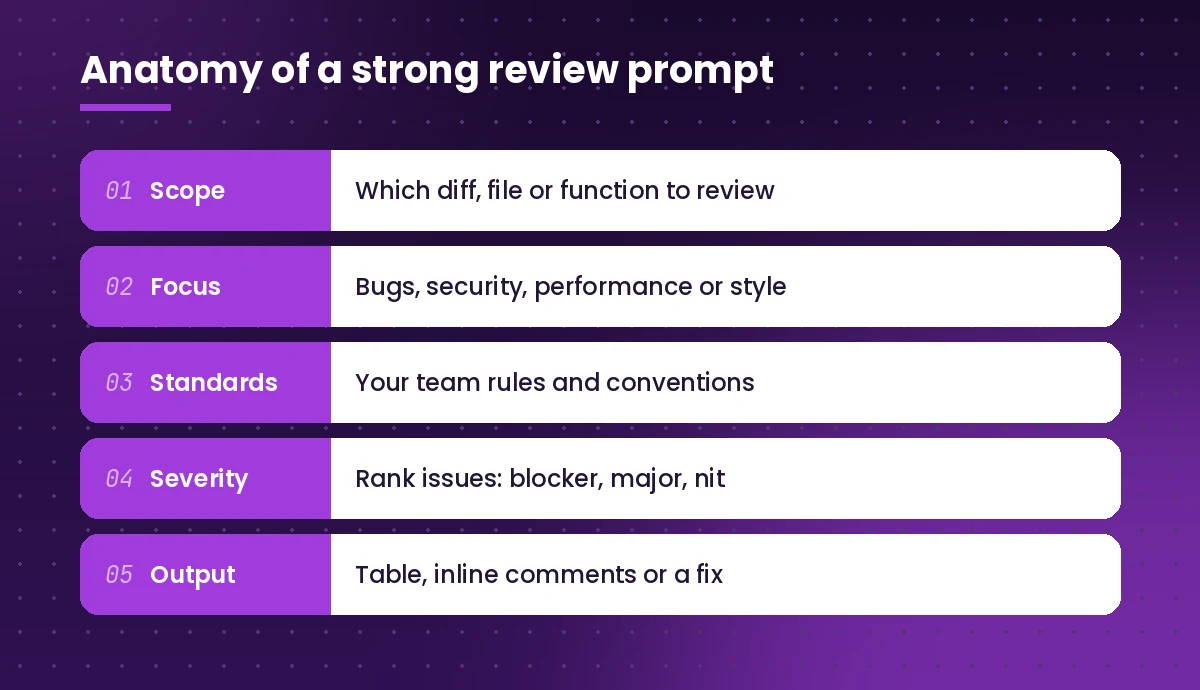
- Scope. Point at the exact diff, file, function or pull request. Smaller scopes give sharper feedback.
- Focus. Name the risk you care about most: correctness, security, performance, readability or tests.
- Standards. Mention your language version, framework and team conventions so suggestions fit your codebase.
- Severity. Ask Copilot to rank findings as blocker, major or nit. This stops trivial style notes from burying real bugs.
- Output. Say whether you want a table, inline-style comments, a summary for the PR description or a corrected version of the code.
If you are new to structuring prompts this way, our guide on how to write Copilot prompts covers the same idea in more depth.
General Review Prompts for Any Change
Start here when you want a broad first pass. Each copilot prompt for code review below works in editor chat. Paste a template, then replace anything in square brackets.
1. The all-round reviewer
Act as a senior [language] reviewer. Review the selected code for bugs, unclear logic, missing error handling and anything that would fail in production. List each issue with the line, why it matters and a suggested fix. Rank issues as Blocker, Major or Nit.2. Review my uncommitted changes
Review #changes before I commit. Focus on logic errors, edge cases I have not handled and leftover debug code. Keep the response under 15 bullet points and skip pure formatting comments.In VS Code, #changes attaches your current source control diff. If your editor uses a different context name, attach the files manually instead.
3. Explain the change first
Summarize what this diff changes in plain language: the behavior before, the behavior after and which callers are affected. Then list anything that looks unintended.Opening with a summary is a quick sanity check. If Copilot’s description of the change does not match what you meant to build, you have found a problem before reading a single comment.
4. The skeptical reviewer
Assume this code has at least three bugs. Find them. For each one, describe the input or state that triggers it and show the minimal fix.This copilot prompt for code review pushes the assistant past “looks good to me” answers. Treat its results as leads to verify, not as confirmed defects.
Pull Request Review Prompts
When you use a copilot prompt for code review on a teammate’s pull request, the goal is clear, actionable feedback that respects their time.
5. First-pass PR review
Review this pull request as if you were the second approver. Check that the change matches the PR description, flag risky files, and list questions I should ask the author. Group feedback by file.6. Write the PR description
Write a pull request description for these changes with sections: Summary, Why, How it works, Testing done, Risks and rollback. Keep it under 200 words and use bullet points.A clear description makes every later review faster, for humans and for Copilot.
7. Turn findings into friendly comments
Rewrite these review notes as constructive pull request comments. Each comment should state the issue, explain the impact in one sentence and suggest a concrete change. Keep the tone collaborative, not critical.8. Large PR triage
This pull request touches many files. Rank the files by review risk (logic changes, data access, auth, public APIs first; renames and formatting last) and tell me where to spend my time.9. Breaking change check
Does this change alter any public function signatures, API responses, database schemas or config keys? List each one, who might depend on it and whether it needs a migration or version bump.Security Review Prompts
Security is where a focused copilot prompt for code review pays off most. Copilot can surface common weaknesses quickly, though it is not a substitute for dedicated scanning tools or a security specialist.
10. Common vulnerability sweep
Review this code for security issues: injection (SQL, command, template), unsafe deserialization, missing input validation, hard-coded secrets, insecure randomness and broken access checks. For each finding, rate severity and show a safer version.11. Authentication and authorization
Trace how this endpoint checks who the user is and what they are allowed to do. Point out any path where a user could read or change data that belongs to someone else.12. Secrets and logging
Check whether this change could log, return or commit sensitive data such as tokens, passwords, personal data or full request bodies. Suggest what to redact or remove.13. Dependency risk
Review the dependency changes in this diff. For each new or upgraded package, tell me what it is used for, whether a standard library option exists and what I should verify before merging.Copilot may not know about recently disclosed vulnerabilities, so confirm package advisories with your dependency scanner or the package registry.
Performance and Reliability Prompts
Slow code often passes review because it looks correct. A performance-minded copilot prompt for code review asks the questions a profiler would.
14. Hot path review
This function runs on every request. Review it for performance: unnecessary loops, repeated database or network calls, large allocations and blocking operations. Estimate the complexity and suggest the single change with the biggest payoff.15. N+1 and query review
Look for N+1 query patterns, missing indexes implied by the filters, and queries that load more columns or rows than needed. Show the improved query or ORM call.16. Concurrency check
Review this code for race conditions, shared mutable state, missing locks or awaits, and retry logic that could cause duplicate work. Describe the timing that would trigger each problem.17. Failure modes
What happens if each external call in this code times out, returns an error or returns empty data? List the failure modes, the current behavior and the behavior I should have instead.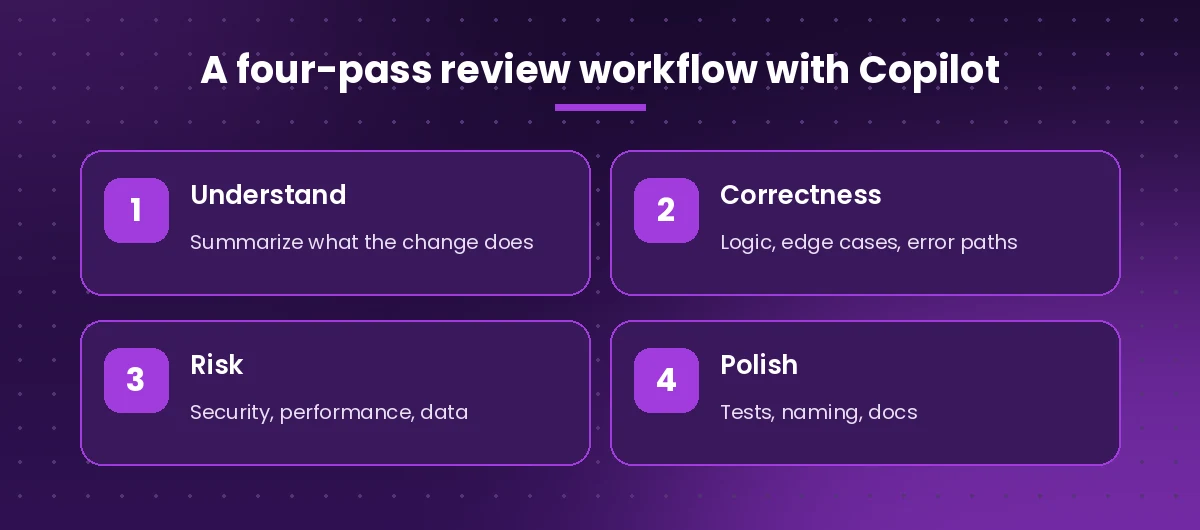
Test Coverage Prompts
Reviewing code without reviewing its tests only tells half the story, so pair every copilot prompt for code review with a test check.
18. Missing test cases
Compare this change with its tests. List behaviors, branches and edge cases that have no test. Then write the three most valuable missing tests using [test framework].19. Test quality review
Review these tests. Flag tests that would still pass if the code were broken, tests that depend on timing or external services, and assertions that are too loose. Suggest fixes.20. Regression test from a bug
This change fixes the bug described below. Write a test that fails on the old code and passes on the new code, and explain why it covers the root cause.
Bug: [describe the bug]
Readability and Maintainability Prompts
21. Naming and clarity
Review the naming in this code. Suggest clearer names for variables, functions and classes that are vague, misleading or inconsistent with the rest of the file. Show before and after.22. Simplify without changing behavior
Refactor this function to be easier to read without changing its behavior. Reduce nesting, remove duplication and extract helpers where it helps. Explain each change in one line.23. Documentation gaps
Which functions in this file would confuse a new team member? Write short doc comments for them that explain intent, inputs, outputs and side effects, not just what the code literally does.24. Consistency with the codebase
Compare this new module with the existing patterns in @workspace. Point out where it handles errors, logging, configuration or dependency injection differently from the rest of the project.25. The final pre-merge checklist
Give me a pre-merge checklist for this change: tests, docs, migrations, feature flags, config, monitoring and rollback. Mark each item Done, Missing or Not applicable based on the diff.Make Copilot Follow Your Team’s Review Rules
Typing your standards into every copilot prompt for code review gets old fast. GitHub Copilot supports repository custom instructions, usually stored in a .github/copilot-instructions.md file, which Copilot reads as extra context. GitHub documents the format and where it applies in its repository custom instructions guide.
A short, specific file works better than a long policy document. For example:
# Review guidelines
- Target Python 3.12 and FastAPI. Use type hints everywhere.
- Flag any database call inside a loop.
- Every new endpoint needs an auth check and a test.
- Never log request bodies or tokens.
- Prefer small functions under 40 lines.
- Treat missing error handling on external calls as a Major issue.
You can also save your favorite review prompts as reusable prompt files in your repository so the whole team runs the same review. Our roundup of GitHub Copilot prompts includes more templates for generating, explaining and fixing code that pair well with these.
A Review Workflow That Actually Saves Time
Throwing one huge request at Copilot tends to produce a long, shallow answer. Several short, focused passes produce better feedback, each with its own copilot prompt for code review. A routine that works well for many developers looks like this:
- Understand. Ask for a plain-language summary of the change and compare it with what you intended.
- Correctness. Run a bug-focused copilot prompt for code review on the riskiest files only.
- Risk. Run the security and performance prompts that match what the change touches.
- Polish. Check tests, naming and docs, then generate the PR description.
Keep each pass scoped to a file or a small group of related files. If Copilot’s answer drifts into generic advice, narrow the scope and restate the focus.
Mistakes to Avoid
- Accepting every suggestion. AI review can be confidently wrong. Read the reasoning, run the tests and reject suggestions that do not fit your design.
- Reviewing without context. Even a well-written copilot prompt for code review fails without background. Copilot cannot see your ticket, your architecture decisions or yesterday’s incident unless you tell it. Add one or two sentences of background.
- Letting nits drown out bugs. Always ask for severity ranking, and ask it to skip formatting issues your linter already handles.
- Skipping the human reviewer. Copilot is a first pass. Design trade-offs, product intent and team knowledge still need a person.
- Pasting secrets into chat. Strip credentials and customer data from snippets before you share them, and follow your company’s AI usage policy.
Quick Reference Table
| Goal | Copilot prompt for code review to start with | Where to run it |
|---|---|---|
| Check before committing | #2 Review my uncommitted changes | Editor chat |
| Review a teammate’s PR | #5 First-pass PR review | GitHub.com or editor |
| Find vulnerabilities | #10 Common vulnerability sweep | Editor chat |
| Speed up slow code | #14 Hot path review | Editor chat |
| Close test gaps | #18 Missing test cases | Editor chat |
| Prepare to merge | #25 Final pre-merge checklist | Editor or GitHub.com |
If you also write code in Microsoft 365 apps, the broader collection of best Microsoft Copilot prompts shows how the same role, context and format pattern carries over to Word, Excel and Outlook.
Final Thoughts
The best reviews come from pairing a fast, tireless first pass with a thoughtful human one. Pick three templates from this list, adapt each copilot prompt for code review to your stack, save them where your team can reuse them, and add your standards to a custom instructions file. Within a week, you will notice pull requests arriving cleaner and review threads getting shorter.
Frequently Asked Questions
What is the best Copilot prompt for code review?
There is no single best one, but a strong prompt names the exact code to review, the risk to focus on (bugs, security, performance or tests), your team standards, and asks for issues ranked by severity with suggested fixes. Template 1 in this guide is a good all-round starting point.
Can GitHub Copilot review pull requests automatically?
On supported plans you can request Copilot as a reviewer on a pull request on GitHub.com, and repository or organization settings may allow automatic reviews. Availability depends on your plan and admin policies, so check GitHub’s documentation for your account.
Does Copilot code review replace human reviewers?
No. Copilot is useful for a fast first pass that catches common mistakes, but it can miss context and sometimes suggest incorrect changes. A human should still approve design decisions and merge the code.
How do I make Copilot follow my team’s coding standards during reviews?
Add a short, specific .github/copilot-instructions.md file to your repository with rules such as language version, error handling expectations and testing requirements. Copilot reads these instructions as extra context in supported features.
Can Copilot find security vulnerabilities in my code?
It can flag common issues such as injection risks, missing validation, hard-coded secrets and weak access checks. It is not a replacement for dedicated security scanning, dependency advisories or a security review by a specialist.
How do I review only my local changes with Copilot?
In VS Code, open Copilot Chat and attach your source control changes (for example with #changes), then ask for a review focused on bugs and edge cases. In other editors, select the changed code or attach the modified files.
One Comment