GitHub Copilot Prompts: 60 Proven Prompts for Code, Tests & Review
Looking for github copilot prompts that save real time? GitHub Copilot can write functions, explain unfamiliar code, generate tests, find bugs and review pull requests, but only if you ask in a way it understands. Here are 60 copy-ready GitHub Copilot prompts for Copilot Chat in VS Code, Visual Studio, JetBrains IDEs and GitHub.com, plus the techniques that make them work.
Key takeaways
- The github copilot github copilot prompts are grouped by task so you can find the right one fast.
- Each of the github copilot prompts uses [brackets] you replace with your own details.
- Pair the github copilot prompts with the four-part formula below for sharper answers.
How to prompt GitHub Copilot
GitHub Copilot works in two main ways:
- Code completions: suggestions as you type, driven by your code, comments and open files.
- Copilot Chat: a chat panel where you ask questions and give instructions in natural language. Depending on your editor and plan, chat may also offer agent-style modes that edit multiple files.
Chat supports helpful shortcuts (availability varies by IDE and version):
| Shortcut | What it does |
|---|---|
/explain | Explain the selected code |
/fix | Propose a fix for problems in the selected code |
/tests | Generate unit tests for the selected code |
/doc | Add documentation comments |
#file or #selection | Add specific context to your prompt |
@workspace | Ask about your whole project (VS Code) |
The quick prompt formula for code
The same four parts used for Microsoft 365 github copilot prompts apply to code:
| Part | In GitHub Copilot | Example |
|---|---|---|
| Goal | The code task | Write a function that validates email addresses |
| Context | Language, framework, constraints | TypeScript, no external libraries, Node 20 |
| Source | Files, selection, examples | Follow the pattern in #file:validators.ts |
| Expectations | Output and quality bar | Include JSDoc and handle empty strings |
Writing new code (1-12)
1. Write a [language] function that [does task]. Inputs: [inputs]. Output: [output]. Handle [edge cases].2. Create a REST API endpoint in [framework] for [resource] with GET, POST, PUT and DELETE, including input validation.3. Write a SQL query that returns [result] from tables [table1] and [table2], joined on [key].4. Create a [React/Vue/Svelte] component that displays [data] in a table with sorting and pagination.5. Write a regular expression that matches [pattern] and explain each part.6. Write a script that reads [file type], transforms [field] and writes the result to [output].7. Create a data model/class for [entity] with fields [fields] and validation rules.8. Write a function that retries [operation] up to 3 times with exponential backoff.9. Implement [algorithm] in [language] and state its time and space complexity.10. Create a CLI tool in [language] that accepts [arguments] and [does task], with --help output.11. Convert this code from [language A] to [language B], keeping the same behavior: #selection12. Following the patterns in #file:[existing file], create a similar module for [new feature].Understanding code (13-20)
13. /explain14. Explain what this function does, step by step, for a developer new to this codebase.15. @workspace Where is [feature, e.g. user authentication] implemented in this project?16. @workspace Give me an overview of this project's architecture and main folders.17. What does this regular expression match? Give examples that pass and fail.18. What are the side effects of calling this function?19. Trace how a request to [endpoint] flows through this codebase.20. Explain this error message and the most likely causes: [paste error]Debugging and fixing (21-30)
21. /fix22. This function should [expected behavior] but instead [actual behavior]. Find the bug and explain the fix.23. Why might this code throw [error] when [condition]?24. Find potential null or undefined errors in this code and suggest safe handling.25. This test is failing with [output]. Is the bug in the test or the code?26. Add logging to this function so I can see where it fails, without logging sensitive data.27. Find race conditions or concurrency issues in this code.28. This query is slow on large tables. Suggest indexes or rewrites to improve performance.29. Why does this work locally but fail in CI? Here's the CI log: [paste log]30. Identify memory leaks or unnecessary allocations in this code.Writing tests (31-40)
31. /tests32. Write unit tests for this function using [Jest/pytest/xUnit/JUnit], covering normal cases, edge cases and errors.33. What edge cases am I missing in these tests?34. Write a test that reproduces this bug before I fix it: [describe bug]35. Mock [dependency] in these tests so they don't call the real [API/database].36. Write integration tests for the [endpoint] endpoint, including authentication failures.37. Convert these tests to use parameterized test cases.38. Generate realistic test data for [entity] with [number] records, including invalid examples.39. Write an end-to-end test with [Playwright/Cypress] for this user flow: [steps].40. Review these tests: are they testing behavior or implementation details?Refactoring and improving (41-50)
41. Refactor this function to be easier to read without changing its behavior.42. Split this large function into smaller functions with clear names.43. Remove duplicated logic between these two functions.44. Rewrite this code to use [async/await / modern syntax / the standard library] instead of [old approach].45. Improve the variable and function names in this file.46. Add type annotations to this [Python/JavaScript] code.47. Replace these magic numbers with named constants.48. Make this code follow the conventions used elsewhere in #file:[file].49. Suggest a design pattern that would simplify this code, and show the refactor.50. Optimize this function for performance and explain the trade-offs.Code review and security (51-56)
51. Review this code for bugs, readability issues and missing error handling. List issues by severity.52. Check this code for security issues such as injection, unsafe deserialization or exposed secrets.53. Does this code validate and sanitize all user input?54. Summarize the changes in this diff and flag anything risky.55. Write a clear pull request description for these changes: what, why, how to test.56. What questions would a senior reviewer ask about this pull request?Documentation and DevOps (57-60)
57. /doc58. Write a README for this project with setup steps, usage examples and configuration options.59. Write a GitHub Actions workflow that installs dependencies, runs tests and lints on every pull request for a [language] project.60. Write a Dockerfile for this [framework] app that uses a small base image and runs as a non-root user.Tips for better GitHub Copilot results
- Open the relevant files. Copilot uses open tabs and referenced files as context. Close unrelated files when you can.
- Write a descriptive comment first. For completions, a comment like
// Parse ISO dates and return null for invalid inputguides the suggestion. - Use specific names.
calculateInvoiceTotalgives Copilot more to go on thancalc. - Give examples. Show one input and expected output for tricky functions.
- Iterate in chat. Ask “make it handle empty arrays” or “use the existing logger” instead of starting over.
- Use custom instructions. Many setups support a repository instructions file (for example
.github/copilot-instructions.md) where you describe coding standards Copilot should follow. - Review everything. Read, run and test generated code. Check licenses, security and dependencies like you would for any contributor.
- Never paste secrets. Keep API keys, passwords and private customer data out of prompts.
Example workflow: fixing a bug with Copilot
- Select the failing code and ask: “This should return [X] for input [Y] but returns [Z]. Why?”
- Ask: “Write a test that reproduces this bug.”
- Run the test and confirm it fails.
- Use
/fixor ask for a fix that makes the test pass without changing other behavior. - Ask: “What other edge cases could break this function?” and add tests.
- Ask: “Write a short PR description for this fix.”
How to Use GitHub Copilot Prompts Effectively
The github copilot prompts in this guide are starting points, not finished scripts. Treat each one as a template: swap the bracketed parts for your own file, function and constraints, then review what GitHub Copilot Chat returns.
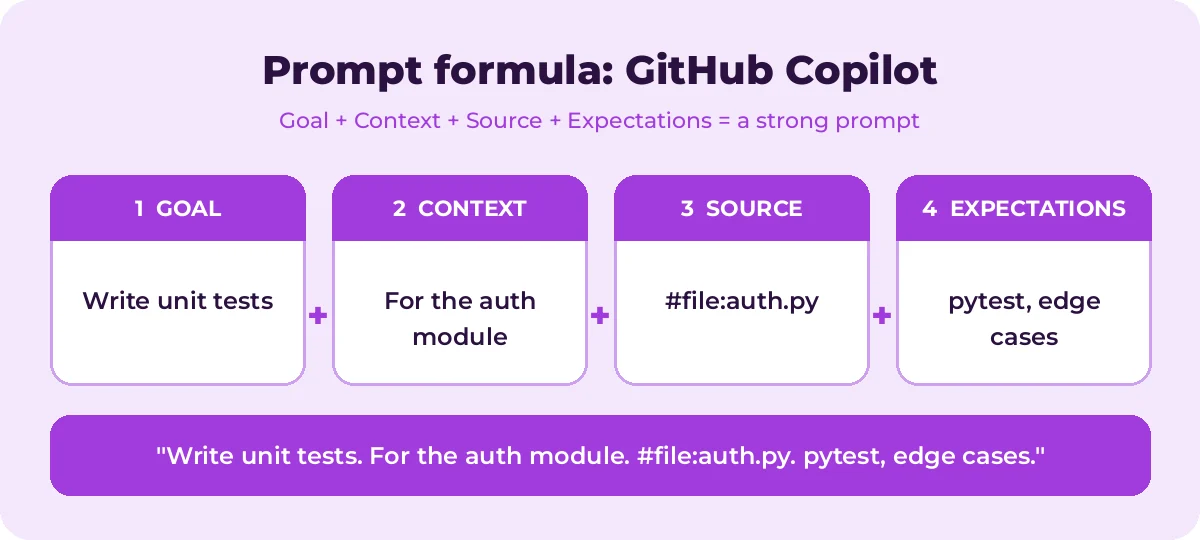
Most weak results come from missing context. The graphic below shows how the four prompt parts fit together for GitHub Copilot tasks.
A simple routine works for nearly every request:
- Start with one clear goal per prompt.
- Name the exact source: files with #file or the current selection.
- Describe the output you want, including length, format and tone.
- Refine with a follow-up instead of starting over.
A few GitHub Copilot-specific tips make a big difference:
- Use #file, #selection or @workspace to give Copilot the right context.
- Ask for tests that cover edge cases and error paths.
- Request a short explanation with every refactor.
Save the github copilot prompts you use most in a shared note so your team can reuse them. That list soon becomes a playbook that keeps quality consistent.
Mistakes That Weaken Your Results
- Being vague about the goal or the audience.
- Pasting sensitive data without checking your organization’s policy.
- Accepting the first answer without checking facts, numbers and names.
- Cramming several unrelated tasks into one request.
Avoid these and even short github copilot prompts will give you cleaner, more reliable answers.
Build a Repeatable GitHub Copilot Workflow
Single prompts help, but chaining them is where the real time savings appear. The diagram shows a four-step flow you can follow.
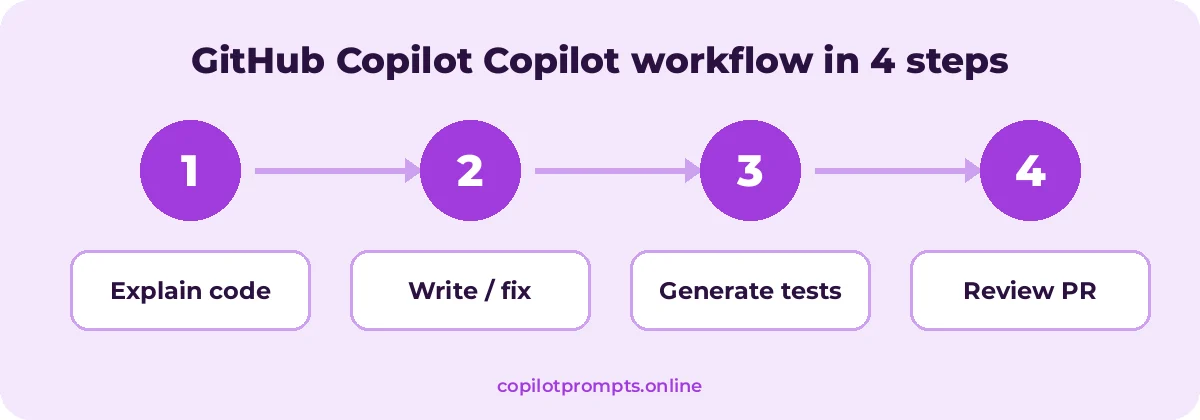
Run each step as its own prompt and check the result before moving on. For official feature details, see prompt engineering for GitHub Copilot.
Frequently asked questions
What is the difference between GitHub Copilot and Microsoft 365 Copilot?
GitHub Copilot is built for software development inside code editors and GitHub. Microsoft 365 Copilot works across Word, Excel, Outlook, PowerPoint and Teams. For the latter, see our best Microsoft Copilot prompts.
Which IDEs support GitHub Copilot Chat?
Copilot Chat is available in VS Code, Visual Studio, JetBrains IDEs and on GitHub.com, among others. Supported features differ by editor and plan.
Can GitHub Copilot write tests for me?
Yes. Select code and use /tests or ask for tests in a specific framework. Always run them and check they test meaningful behavior.
Is code from GitHub Copilot safe to use?
Treat it like code from any teammate: review it, test it and scan it for security issues. GitHub offers settings, such as filtering suggestions that match public code, depending on your plan.
How do I give Copilot more context about my project?
Open relevant files, reference them with #file, use @workspace in VS Code, and add repository custom instructions describing your conventions.
Do these GitHub Copilot prompts work in VS Code and JetBrains?
Yes. They work in Copilot Chat in VS Code, Visual Studio, JetBrains IDEs and on github.com, though context variables can differ slightly.
Conclusion
The more you reuse and refine github copilot prompts, the better your results get.
GitHub Copilot is fastest when you treat it like a capable pair programmer: give it a clear task, the right files and a definition of done. Use these 60 prompts to write, understand, test and review code, and keep refining your requests in chat. For non-coding work, browse our guide on how to write Copilot prompts. Bookmark this page and come back whenever you need fresh github copilot prompts.