Copilot Prompts for HR: 50 Practical Ideas for Hiring & Onboarding
Looking for copilot prompts for hr that save real time? HR teams juggle hiring, onboarding, employee questions, policies and performance cycles, often with too little time. Copilot can help draft job descriptions, interview guides, onboarding plans and policy documents in minutes. Below are copy-ready Copilot prompts for HR, grouped by the work you do every week.
Key takeaways
- The copilot prompts for hr below are grouped by task so you can find the right one fast.
- Each of the copilot prompts for hr uses [brackets] you replace with your own details.
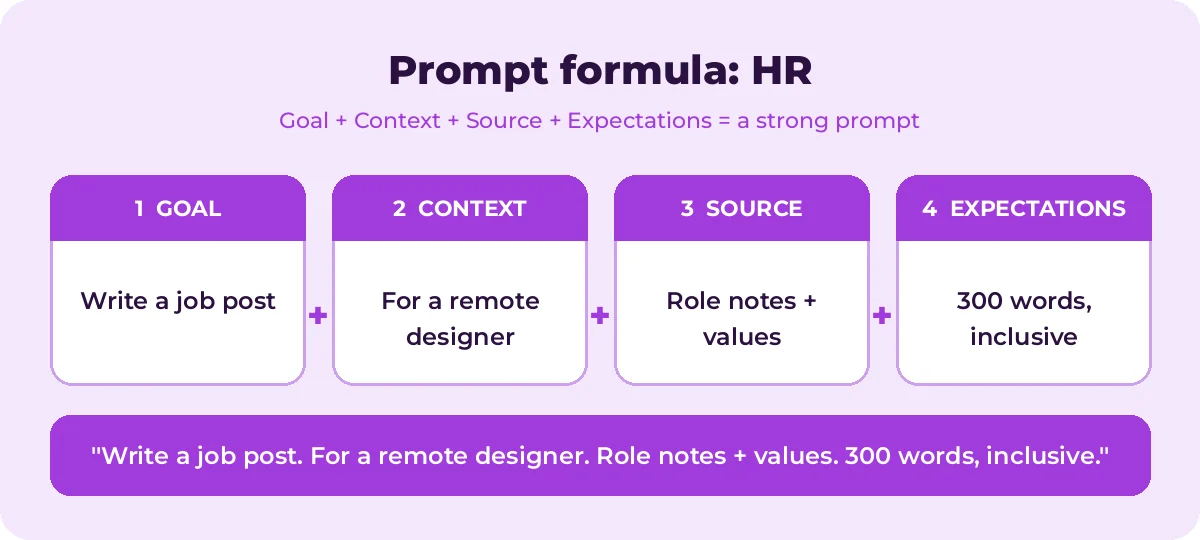
- Pair the copilot prompts for hr with the four-part formula below for sharper answers.
Important: HR work affects people’s jobs, pay and privacy. Use Copilot to draft and organize, but always have a human make decisions, check for bias, and confirm anything legal or contractual with qualified advisors. Follow your organization’s data policies before entering any employee information.
The quick prompt formula for HR
| Part | In HR | Example |
|---|---|---|
| Goal | The document or task | Write a job description |
| Context | Role, team, audience | Mid-level data analyst, hybrid, growing team |
| Source | Files or notes to use | /Hiring Manager Notes, /Salary Bands |
| Expectations | Format and tone | Inclusive language, under 500 words, bulleted requirements |
New to prompting? Read How to Write Copilot Prompts.
Recruiting and job descriptions
Write a job description for a [job title] in our [department] team. Include a short company intro, role summary, responsibilities, required skills, nice-to-have skills and benefits. Use inclusive, gender-neutral language and keep it under 500 words.Review this job description for biased or exclusionary language and suggest more inclusive alternatives: [paste text]Separate these requirements into true must-haves and nice-to-haves, and explain your reasoning: [paste list]Write 5 LinkedIn post variations announcing that we are hiring a [job title]. Keep each under 80 words.Draft an outreach message to a potential candidate for [role], mentioning why their background in [skill] caught our attention. Under 100 words.Create a skills matrix for a [job title] with skills, required level and how to assess each.Interviewing
Create a structured interview guide for a [job title] with 8 behavioral questions tied to these competencies: [competencies]. Include what a strong answer looks like for each.Write 5 technical screening questions for a [job title] and a simple scoring rubric from 1 to 5.Create an interview scorecard template with competencies, rating scale, evidence notes and overall recommendation.Suggest questions candidates commonly ask about [role/company] and draft clear answers for our interviewers.Summarize these interview notes into strengths, concerns and open questions, using only the evidence provided: [notes]Draft a polite rejection email to a candidate who interviewed for [role], thanking them and encouraging them to apply again.Draft an offer email to [candidate] for [role], with placeholders for salary, start date and benefits, in a warm tone.Onboarding
Create a 30-60-90 day onboarding plan for a new [job title], with goals, key meetings, training and checkpoints for each phase.Write a welcome email for a new hire starting on [date], covering first-day logistics, who to ask for and what to bring.Create a first-week schedule for a new [role] with introductions, system access, training and time to settle in.Turn /[Employee Handbook] into a one-page "what you need to know in week one" summary.Create an onboarding checklist for managers with tasks before day one, on day one, in week one and in month one.Write 10 FAQs new hires usually ask about [benefits/IT/time off] with answers based on /[policy document].Create a buddy program guide explaining the buddy's role, expectations and suggested conversation topics.Policies and handbooks
Draft a [remote work/hybrid/expense/travel] policy for a [company size] company. Include purpose, scope, eligibility, rules, responsibilities and exceptions. Mark anything that needs legal review.Rewrite this policy in plain language so employees can understand it quickly, without changing its meaning: [paste policy]Summarize the key changes between /[old policy] and /[new policy] in a table.Write an employee announcement about the updated [policy], explaining what is changing, why and when.Create an FAQ for managers about the new [policy] with 8 likely questions and clear answers.Review this handbook section for unclear wording, contradictions or missing information: [paste text]Performance and development
Create a performance review template with sections for goals, achievements, strengths, development areas and next-period goals.Help me write constructive, specific feedback for an employee who [situation], focused on behavior and impact, not personality.Turn these notes into a balanced performance summary with examples: [notes]. Avoid vague words like "great" or "bad".Write SMART goals for a [job title] focused on [area].Create a performance improvement plan template with clear expectations, support offered, timeline and check-in dates.Suggest 5 development opportunities for a [role] who wants to grow in [skill].Write 10 questions managers can use in career development conversations.Employee engagement and communication
Write a 10-question employee engagement survey covering workload, growth, recognition, manager support and belonging.Summarize these anonymous survey comments into main themes, with the number of comments per theme: [paste comments]Draft an all-staff message announcing [change], with empathy and clear next steps.Create ideas for a low-budget recognition program for a [team size] remote team.Write a message thanking employees for their work during [period/event].Draft talking points for managers to explain [organizational change] to their teams.Offboarding
Create an offboarding checklist covering knowledge transfer, equipment return, access removal and final pay steps.Write 8 exit interview questions that encourage honest, useful feedback.Draft a farewell announcement for [name], who is leaving after [years] years, in a positive, respectful tone.HR analytics with Copilot in Excel
If your HR data is in Excel, combine these with our Copilot prompts for Excel:
Show headcount by department and location.Calculate turnover rate by department for the last 12 months.Show average time to hire by role and recruiter.Use anonymized or aggregated data wherever possible.
Compliance and employee relations
copilot prompts for hr help you prepare, not decide. Use them to organize information and draft communication, then apply your own judgment and get expert advice where needed.
Create a checklist of information HR should gather before investigating a workplace complaint about [type of issue], without reaching any conclusions.Draft a neutral meeting invitation for an employee relations conversation about [topic], explaining the purpose and that they may ask questions.Summarize the key steps in our /[disciplinary or grievance policy] as a manager quick-reference guide.Create a training outline for managers on [topic, e.g. respectful workplace behavior], with scenarios and discussion questions.List the documents we should keep for [process] and who should have access to each, based on /[records policy].Weak vs. strong HR prompts
| Weak prompt | Strong prompt |
|---|---|
| Write a job ad | Write a job description for a hybrid mid-level data analyst in our finance team, with must-have and nice-to-have skills, inclusive language and under 500 words |
| Onboarding plan | Create a 30-60-90 day onboarding plan for a new customer support lead, with goals and checkpoints for each phase |
| Make this policy better | Rewrite this policy in plain language for frontline employees without changing its meaning |
The strong versions name the role, the audience and the expected format. Adding those three details is usually enough to turn a generic draft into one you can use with light edits.
Tips for using Copilot in HR
- Protect personal data. Avoid pasting names, health information, salaries or performance details unless your organization has approved Copilot for that use.
- Check for bias. Ask Copilot to review drafts for biased language, then review again yourself.
- Keep humans in charge. Never let AI decide hiring, promotion, discipline or termination.
- Verify legal content. Employment law varies by country and state. Have policies and contracts reviewed by qualified professionals.
- Use your own sources. Ground drafts in your handbook and policies with / references so answers match your organization.
- Build a prompt library. Save the prompts that work for your team so everyone uses consistent, high-quality templates.
How to Use Copilot Prompts for HR Effectively
The copilot prompts for hr in this guide are starting points, not finished scripts. Treat each one as a template: swap the bracketed parts for your own role, policy and audience, then review what Copilot returns.
Most weak results come from missing context. The graphic below shows how the four prompt parts fit together for HR tasks.
A simple routine works for nearly every request:
- Start with one clear goal per prompt.
- Name the exact source: your role notes, policy draft or survey file.
- Describe the output you want, including length, format and tone.
- Refine with a follow-up instead of starting over.
A few HR-specific tips make a big difference:
- Never paste personal employee data unless your policy allows it.
- Ask for inclusive, bias-free language in every job post.
- Have a person review any policy or legal wording.
Save the copilot prompts for hr you use most in a shared note so your team can reuse them. That list soon becomes a playbook that keeps quality consistent.
Mistakes That Weaken Your Results
- Being vague about the goal or the audience.
- Pasting sensitive data without checking your organization’s policy.
- Accepting the first answer without checking facts, numbers and names.
- Cramming several unrelated tasks into one request.
Avoid these and even short copilot prompts for hr will give you cleaner, more reliable answers.
Build a Repeatable HR Workflow
Single prompts help, but chaining them is where the real time savings appear. The diagram shows a four-step flow you can follow.

Run each step as its own prompt and check the result before moving on. For official feature details, see Microsoft Copilot adoption hub.
Frequently asked questions
Can Copilot write job descriptions?
Yes. Give it the role, team, responsibilities and must-have skills, and ask for inclusive language. Always review and adjust before posting.
Is it safe to use Copilot with employee data?
Microsoft 365 Copilot follows your organization’s existing permissions and compliance settings, but you should still follow internal policies and avoid sharing sensitive data unnecessarily.
Can Copilot screen candidates?
Use it to organize and summarize information, not to make hiring decisions. Automated screening can raise fairness and legal issues in many places.
Can Copilot help write HR policies?
It can produce a solid first draft and plain-language rewrites. Have legal or HR compliance experts review final versions.
What other prompts help HR teams?
Our Outlook prompts help with candidate and employee emails, and our Teams meeting prompts help with interview debriefs and team meetings.
Are Copilot prompts for HR safe to use with employee data?
Use them within your organization’s approved Copilot setup and data policy. Avoid pasting sensitive personal details into consumer tools.
Conclusion
The more you reuse and refine copilot prompts for hr, the better your results get.
Copilot can take hours of drafting off an HR team’s plate, from job descriptions and interview guides to onboarding plans and policy updates. Use copilot prompts for hr as starting points, ground them in your own documents, and keep people at the center of every decision. For more ideas, explore our best Microsoft copilot prompts for hr or Copilot prompts for teachers. Bookmark this page and come back whenever you need fresh copilot prompts for hr.