GitHub Copilot Prompts for Refactoring: 28 Proven Templates for Cleaner, Safer Code
GitHub Copilot prompts for refactoring work best when they tell the assistant exactly what to change, what must stay the same, and how to prove nothing broke. Type “clean this up” into the chat and you usually get a confident rewrite that renames half your variables, changes a return type and quietly drops an edge case.
This guide shows you how to frame a refactor so Copilot behaves like a careful senior teammate instead of an eager intern. You get a simple prompt structure, a safe workflow, and 28 copy-ready templates grouped by the job you are doing. Replace anything in square brackets with your own details.
Why “Clean This Up” Rarely Works
Refactoring has one rule that separates it from rewriting: the external behavior of the code must not change. Only the internal structure improves.
Copilot does not know that rule unless you say it. A vague request gives the model permission to “improve” anything, so it often mixes three different kinds of change in one answer:
- Structural changes you wanted, such as extracting a function.
- Behavior changes you did not want, such as handling
nulldifferently. - Style churn that bloats the diff, such as renaming every local variable.
Mixed diffs are hard to review, and hard-to-review diffs are where regressions hide. The fix is not a smarter model. It is a tighter instruction, and that is exactly the gap well-written GitHub Copilot prompts for refactoring close.
Where to Run Refactoring Prompts
You can refactor code with Copilot in several places, and each suits a different size of change. The same GitHub Copilot prompts for refactoring work in all of them; only the scope you give them changes.
| Surface | Best for | Watch out for |
|---|---|---|
| Inline chat (Ctrl+I / Cmd+I) | One function or a highlighted block | Limited view of the rest of the file |
| Copilot Chat panel (ask) | Explaining code and proposing a plan | Suggestions still need applying by hand |
| Edit or agent mode | Multi-file changes, running tests | Can wander beyond your intended scope |
| Pull request review | Spotting refactor opportunities in a diff | Comments, not changes |
A few chat features make refactoring requests sharper. In VS Code you can attach context with references such as #file, #selection or #codebase, and you can use /explain to understand code before you touch it and /tests to generate tests that pin current behavior. Exact names vary a little between editors, so check the menu in your IDE.
GitHub also maintains a Copilot Chat cookbook section on refactoring code, with worked examples for readability, performance, design patterns, data access layers and inheritance. It is worth a skim if you want to see the official approach.
The Anatomy of a Safe Refactoring Prompt
Strong GitHub Copilot prompts for refactoring contain four parts. Leave one out and the result gets noticeably worse.
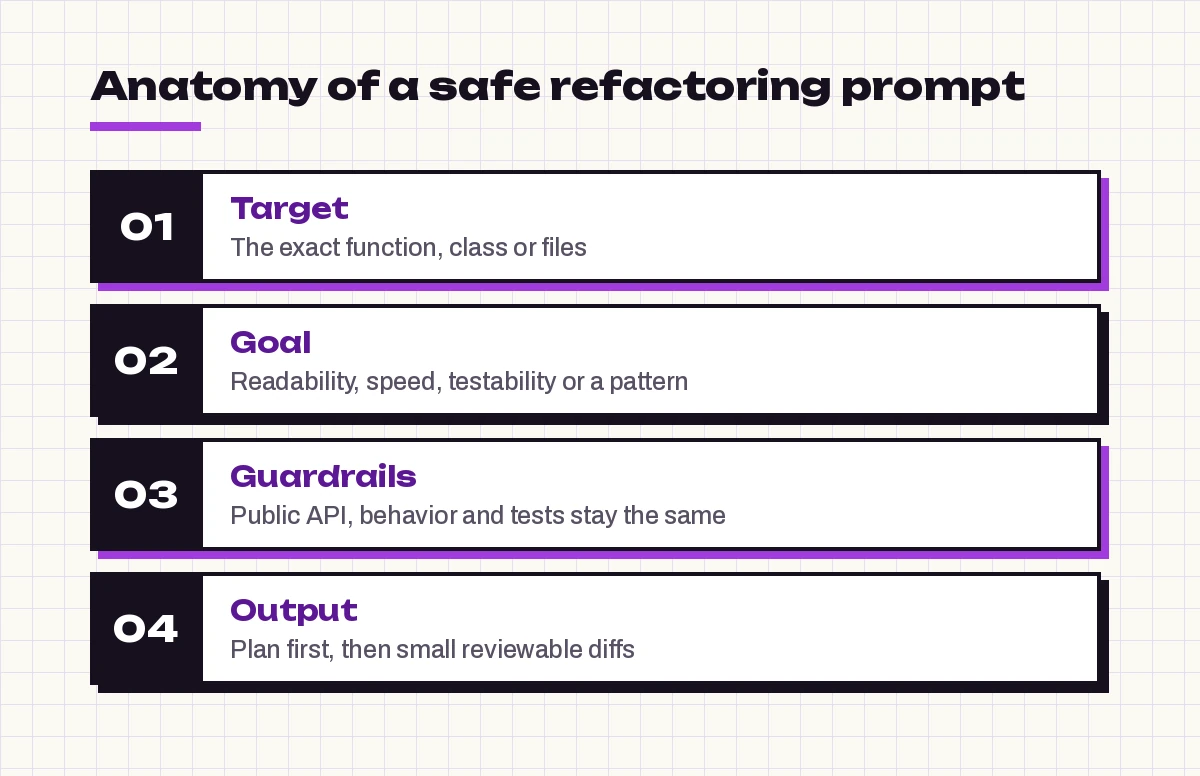
- Target. The exact function, class or files. “The
calculateInvoicefunction in #file:billing.ts” beats “this code.” - Goal. One reason for the refactor: readability, testability, performance, a specific pattern, or removing duplication.
- Guardrails. What must not change. Public signatures, return values, error behavior, and the existing tests are the usual ones.
- Output. How you want the answer: a plan first, a single diff, small numbered steps, or an explanation of each change.
Here is that structure as a reusable skeleton:
Refactor [function/class/file] to improve [one goal].
Keep the public API, return values, error handling and side effects exactly the same.
Do not rename public symbols or change dependencies.
First list the steps you plan to take and any risks. Wait for my OK before editing.
That last line is the most underrated instruction in the whole guide. Asking for a plan first turns a guess into a reviewable proposal.
A Four-Step Loop That Keeps Refactors Safe
Every template below fits inside one simple loop. Follow it and you rarely need to roll back.
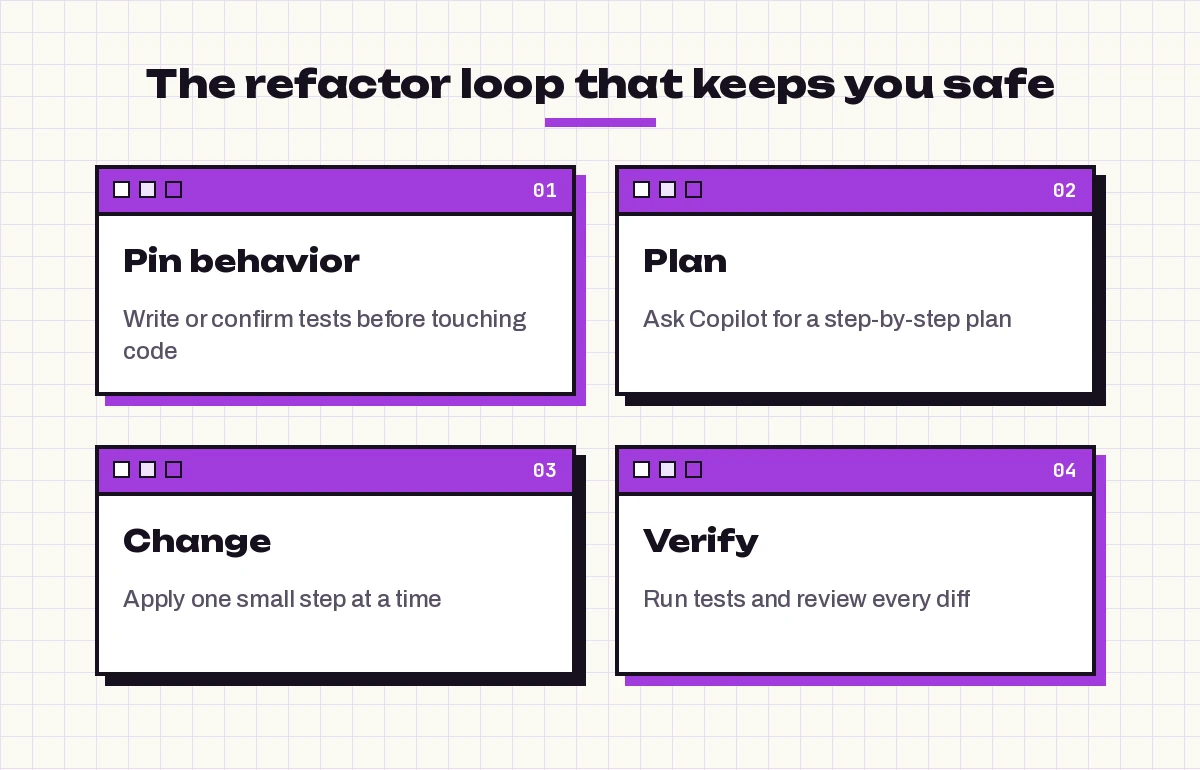
- Pin behavior. Make sure tests cover what the code does today, including the odd cases. If coverage is thin, write characterization tests first.
- Plan. Ask Copilot to describe the steps before it edits anything.
- Change. Apply one step at a time, so each diff is small enough to read in a minute.
- Verify. Run the tests after each step and review the diff yourself.
If you need help with the first step, our guide to GitHub Copilot prompts for unit tests has templates for edge cases, mocks and coverage gaps.
GitHub Copilot Prompts for Refactoring: Understand the Code First
You cannot safely restructure code you do not understand. The first GitHub Copilot prompts for refactoring you run should change nothing at all, so these four are read-only by design.
1. Explain what the code really does
/explain Walk through #selection step by step. List every input, output and side effect, including database writes, network calls, logging and thrown exceptions. Point out any behavior that looks accidental but that callers might rely on.2. Map the dependencies
Using #codebase, find every caller of [function or class]. For each one, tell me which parameters it passes and how it uses the return value. I want to know what would break if the signature changed.3. Find code smells, ranked
Review #file:[file name] for code smells: long functions, deep nesting, duplication, unclear names, magic numbers and mixed responsibilities. Rank them by how much they hurt readability and how risky each fix is. Do not change any code yet.4. Measure complexity in plain language
Which three functions in #file:[file name] are the hardest to follow and why? For each, suggest one refactoring that would give the biggest clarity gain for the smallest change.Prompts That Protect Behavior First
These templates create the safety net that every other request in this guide depends on. Skip them only if your tests already cover the code well, because GitHub Copilot prompts for refactoring are only as safe as the tests behind them.
5. Characterization tests
Write characterization tests for [function] that capture its current behavior exactly, even where that behavior looks wrong. Cover typical inputs, empty and null values, boundary values and error cases. Use [test framework] and our existing test style.6. Find untested paths
Compare [function] with its tests in #file:[test file]. List the branches and edge cases that no test exercises. Then write tests for the riskiest three.7. Snapshot a complex output
[function] returns a large nested object. Write a test that records its output for these three sample inputs: [inputs]. The goal is to detect any change in output during a refactor.Readability Prompts for Messy Functions
This is where most people start, and where GitHub Copilot prompts for refactoring pay off fastest. Keep each request to one kind of change.
8. Extract functions
Refactor #selection by extracting well-named helper functions for each distinct step. Keep the original function as a short coordinator that calls them. Do not change behavior, parameter order or return type.9. Flatten nested conditionals
Reduce the nesting in #selection using guard clauses and early returns. Keep every condition and its outcome identical. Show the before-and-after control flow as a short list so I can check it.10. Better names, nothing else
Suggest clearer names for the local variables and private helpers in #selection. Only rename; change no logic. Present the renames as a table of old name, new name and reason before applying them.11. Replace magic numbers and strings
Find the magic numbers and hard-coded strings in #file:[file name]. Replace them with named constants grouped at the top of the file or in [config module]. Behavior must stay the same.12. Remove duplication
#file:[file A] and #file:[file B] contain near-duplicate logic for [task]. Propose one shared function that both can call. List any small differences between the two versions so we do not lose them when merging.13. Simplify a long boolean expression
Simplify the condition in #selection so it is easier to read. You may introduce well-named boolean variables. Prove the new version is equivalent by listing the cases you checked.Prompts to Restructure Classes and Modules
Larger structural moves carry more risk, so these GitHub Copilot prompts for refactoring lean heavily on plans and small steps.
14. Split a large class
[ClassName] in #file:[file name] has too many responsibilities. Identify the separate responsibilities, propose new classes for each, and give me a step-by-step migration plan where every step leaves the code compiling and the tests passing. Do not edit yet.15. Apply a design pattern only if it fits
Would a [strategy/factory/adapter] pattern improve #selection? Explain the trade-offs honestly. If the pattern adds more complexity than it removes, say so and suggest a simpler option.16. Replace a switch with polymorphism or a lookup
The switch statement in #selection grows every time we add a [type]. Suggest a refactor using a lookup table or polymorphism. Keep the default case behavior identical and show how adding a new [type] would work afterward.17. Separate business logic from data access
In #file:[file name], database queries are mixed with business rules. Propose a refactor that moves data access into a repository layer so the business logic can be unit tested without a database. Keep the query results and transaction behavior the same.18. Untangle inheritance
Review the class hierarchy rooted at [BaseClass]. If it is deeper than it needs to be, suggest how to replace parts of it with composition. Explain what changes for each subclass and which tests should cover the change.19. Introduce dependency injection
[ClassName] creates its own dependencies with `new`, which makes it hard to test. Refactor it to receive [dependencies] through the constructor. Update the callers in #codebase and keep default behavior for existing code paths.Modernizing Legacy Code
Legacy code is where an assistant shines and where it can do the most damage. When you use GitHub Copilot prompts for refactoring on old code, narrow scope is everything.
20. Modernize syntax in one file
Update #file:[file name] to modern [language/version] syntax, for example [async/await instead of callbacks, f-strings, optional chaining]. Change syntax only, not logic. Flag any spot where the modern form behaves slightly differently.21. Replace a deprecated API
[library/method] is deprecated. Find every use in #codebase and propose replacements with [new API]. Group the changes by file and note any call site where the new API handles errors or defaults differently.22. Add types gradually
Add type annotations to #file:[file name] without changing runtime behavior. Where a type is unclear, use the narrowest type you can justify and add a TODO comment instead of guessing.23. Translate a module to another language
Translate #file:[file name] from [source language] to [target language]. Keep the same function names, inputs and outputs so existing callers can switch over. List any library or behavior that has no direct equivalent.Performance-Focused Refactors
Speed refactors still must not change results. Performance-minded GitHub Copilot prompts for refactoring should ask for evidence, not guesses.
24. Find the expensive parts
Analyze #selection for performance problems: repeated work inside loops, N+1 queries, unnecessary allocations and blocking I/O. For each, estimate the impact as high, medium or low and explain why. Do not change code yet.25. Optimize without changing output
Refactor [function] to reduce [time/memory] for large inputs. The output must be identical for every input. Write a quick test that compares the old and new versions on [sample data] before I delete the old one.If an optimization exposes a bug rather than fixing one, switch to our GitHub Copilot prompts for debugging to track down the root cause before you continue.
Agent Mode Refactoring Prompts
Agent mode refactoring can edit many files, run your test suite and iterate on failures. That power is exactly why GitHub Copilot prompts for refactoring aimed at an agent need firm limits.
26. Multi-file rename or move
Move [module] from [old path] to [new path] and update every import in the workspace. Do not change any other code. Run the test suite when you finish and report the results. Stop and ask if anything outside imports needs to change.27. Step-by-step refactor with checkpoints
Carry out this refactor plan one step at a time: [paste plan]. After each step, run [test command]. If tests fail, revert that step and explain why instead of changing the tests. Summarize the diff after each step.28. Technical debt sweep with a boundary
Fix only these items of technical debt in [folder]: [list]. Do not touch files outside [folder], public APIs or test expectations. When done, list every file you changed and why.Notice the pattern in all three: a fixed scope, a test command, and an explicit “stop and ask” rule. Without those, an agent tends to fix things you never asked it to touch.
Make Your Best Templates Reusable
Once a few GitHub Copilot prompts for refactoring work well for your codebase, stop retyping them.
- Repository instructions. Add standing rules to your Copilot instructions file, such as “Refactors must not change public APIs” and “Never edit test expectations to make a refactor pass.”
- Prompt files. Save templates 8, 14 and 27 as Copilot prompt files so the whole team can run them as slash commands with the same guardrails.
- Review the result. Run a Copilot prompt for code review over the final diff, then read it yourself. AI review supplements human review; it does not replace it.
Common Refactoring Mistakes With Copilot
Most bad outcomes trace back to a handful of habits, not to the GitHub Copilot prompts for refactoring themselves.
- Refactoring without tests. If nothing pins the current behavior, you cannot tell a clean refactor from a subtle bug.
- One giant request. “Modernize this service” produces a diff nobody can review. Ask for a plan, then one step at a time.
- Accepting test changes. If Copilot edits an assertion so the suite passes, treat it as a red flag, not a fix.
- Mixing goals. Readability and performance pull in different directions. Pick one per pass.
- Forgetting hidden callers. Reflection, configuration files, serialized data and other repositories can depend on names that look private.
- Trusting confident explanations. The model can describe a change as “behavior-preserving” when it is not. Your tests decide, not the summary.
A Worked Example
Here is how the GitHub Copilot prompts for refactoring above fit together on a real task. Imagine a 120-line processOrder function that validates input, calculates totals, applies discounts, writes to the database and sends an email.
First, run template 1 to list its side effects. Copilot points out that it sends the email before the database commit, which callers might depend on. Note that down; the refactor must keep that order.
Next, use template 5 to add characterization tests, including a case with an expired discount code. Then ask for a plan with template 14. A sensible plan extracts validateOrder, calculateTotals and applyDiscounts as pure functions first, because they are easy to test, and leaves the database and email calls in place for now.
Apply one extraction at a time with template 8, running the tests after each. When all three are done, processOrder reads like a short table of contents. Only then would you consider template 17 to move the database code behind a repository.
At no point did you ask Copilot to “make it better.” Every request had a target, a goal, guardrails and an expected output.
For more coding templates beyond refactoring, browse our full library of GitHub Copilot prompts.
Final Thoughts
Refactoring with an AI assistant is not about handing over the keyboard. It is about writing instructions precise enough that the assistant’s speed works for you rather than against you.
The best GitHub Copilot prompts for refactoring share the same shape. Start with the four-part structure, protect behavior with tests, and keep each change small enough to review. Save the templates that fit your codebase, and your team gets cleaner code with fewer surprises in production.
Frequently Asked Questions
Can GitHub Copilot refactor code automatically?
Yes. With clear GitHub Copilot prompts for refactoring, Copilot Chat, inline chat and agent mode can all propose and apply refactors. It works best when you name the exact code, the goal and what must not change, and when you review each diff and run your tests before accepting it.
What is the best prompt to refactor code with Copilot?
Most effective GitHub Copilot prompts for refactoring follow one pattern. A good default is: “Refactor [target] to improve [goal]. Keep the public API, return values and side effects the same. List your plan first and wait for my OK.” The plan-first step catches most unwanted changes before they happen.
How do I stop Copilot from changing behavior during a refactor?
State the guardrails in the prompt, make sure tests cover current behavior before you start, and tell Copilot never to edit test expectations. Then run the tests after every small step.
Should I use agent mode or chat for refactoring?
Use chat or inline chat for single functions and for planning. Use agent mode for mechanical multi-file changes such as moves and renames, with a clear scope, a test command and an instruction to stop and ask before going beyond that scope.
Can Copilot help refactor legacy code with no tests?
Yes, but start by asking it to explain the code and write characterization tests that capture what it does today. Only refactor once those tests pass, and keep the first changes small.
Does Copilot refactoring replace code review?
No. Copilot can suggest improvements and even review a diff, but a person who understands the system should still read the final change, especially where hidden callers or business rules are involved.