Copilot Prompt for Performance Review: 26 Proven Templates for Managers and Employees
A good copilot prompt for performance review season can turn a year of scattered notes, project updates and half-remembered wins into a clear, specific write-up in minutes instead of hours. This guide gives you 26 copy-ready templates for Microsoft Copilot, split by who is writing and what stage they are at: employees preparing a self-assessment, managers drafting evaluations, both sides setting goals, and HR or team leads preparing for calibration.
Reviews are hard to write for a simple reason. You are asked to summarize twelve months of work, stay honest without sounding harsh, and match a rating framework you only look at once or twice a year. A well-built copilot prompt for performance review work is useful for the mechanical parts: organizing evidence, finding patterns, proposing structure and smoothing the wording. The judgment about how someone actually performed still belongs to you.
Why Use Copilot for Performance Reviews
Most of the effort in a review goes into three tasks: remembering what happened, turning raw activity into outcomes, and phrasing feedback so it lands well. Copilot helps with each one.
- Recall. In Microsoft 365 Copilot Chat with work data, you can ask Copilot to summarize your sent emails, meeting recaps and documents from a date range, which surfaces projects you had forgotten about.
- Structure. In Word, Copilot can draft a document from your notes and reference files, so the review follows your company’s sections instead of starting from a blank page. Microsoft’s Copilot in Word help hub explains the drafting and rewrite options.
- Wording. Copilot can rewrite a blunt sentence into constructive feedback, shorten a rambling paragraph, or flag vague claims that need a concrete example.
What Copilot cannot do is know whether a project really went well, or how one person’s contribution compared with the rest of the team. Treat every draft from a copilot prompt for performance review request as a starting point you verify line by line.
What to Include in a Copilot Prompt for Performance Review Writing
The gap between a generic review and a useful one usually comes down to the context in your request. Before you type anything, gather five ingredients.
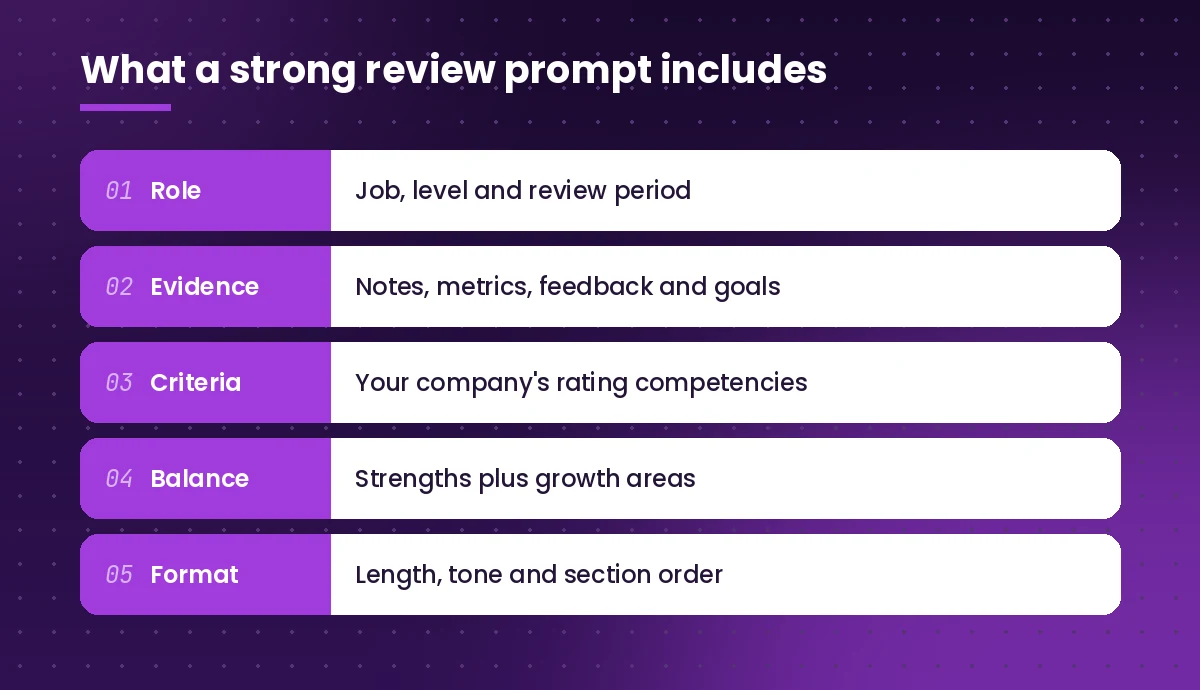
- Role and period. Job title, level, team and the exact review window, such as January to December.
- Evidence. Notes, metrics, shipped work, customer comments, peer feedback and the goals set at the start of the cycle. Attach files where you can rather than paraphrasing them.
- Criteria. Paste your company’s competencies or rating scale. A draft written against “communication, ownership, technical depth” reads very differently from one written against no framework at all.
- Balance. Ask explicitly for strengths and growth areas. Without that instruction, drafts tend to drift toward praise.
- Format. Word count, tone, headings and whether you want bullet points or prose for your review tool.
If you want a refresher on prompt structure in general, our guide on how to write Copilot prompts breaks down the goal, context, source and expectation pattern that Microsoft recommends.
Prompts for Employee Self-Assessments
A self-assessment is your chance to put your own evidence on the record before your manager writes theirs. Each copilot prompt for performance review template below helps you remember, quantify and present your work without overselling it.
1. Rebuild your year from your own activity
Review my emails, meetings and documents from January 1 to December 31 this year. List the main projects I worked on, my role in each, the outcome, and any dates or numbers mentioned. Group them by quarter and flag anything where my contribution is unclear.This works best in Copilot Chat with access to your work data. As a first copilot prompt for performance review step for self-assessments, this one surfaces the raw material. Check every item, because a project you were copied on is not the same as a project you led.
2. Turn activities into outcomes
Here is a list of tasks I completed this year: [paste list]. Rewrite each one as an outcome statement that explains the result and why it mattered to the team or customer. Keep each under 30 words and do not invent numbers. Where a metric would help, write [ADD METRIC] instead.The placeholder instruction matters in any copilot prompt for performance review drafting. It stops Copilot from filling gaps with made-up figures you might miss later.
3. Map achievements to your competencies
My company rates performance on these competencies: [paste competencies and definitions]. Using the achievements below, suggest which competency each one best demonstrates and write one sentence of evidence for each. Point out any competency where I have no strong example.

[paste achievements]
4. Write the self-assessment draft
Draft a self-assessment for my annual review as a [job title] at [level]. Use the achievements and competency mapping below. Structure: summary (3 sentences), key accomplishments (4-6 bullets with evidence), areas I want to grow (2-3 honest points with what I am already doing about them), and goals for next year. Tone: confident, factual, not boastful. Length: about 450 words.5. Describe a weakness honestly
I struggled with [specific issue, e.g. missing deadlines during the Q3 migration]. Help me write two or three sentences for my self-assessment that acknowledge this honestly, explain what I learned, and describe the concrete steps I have taken since. Avoid excuses and avoid sounding defeated.6. Check for overclaiming
Read my self-assessment draft below. Highlight any sentence where I claim credit that might belong to a team, use vague words like "helped" or "supported" without saying how, or make a claim without evidence. Suggest a more precise version for each.Running this copilot prompt for performance review check before you submit makes your manager’s job easier and builds trust, because every claim is backed by something they can verify.
Prompts for Managers Writing Reviews
Managers usually write several reviews in the same few weeks, which is when quality drops and wording starts repeating. The copilot prompt for performance review templates below keep each write-up specific to the person.
7. Summarize evidence for one team member
I am writing an annual review for [name], a [job title] on my team. Using the attached one-on-one notes, project updates and peer feedback, summarize their main contributions, recurring strengths and recurring challenges this year. Quote or reference the source for each point so I can check it.Asking for sources keeps the summary grounded and makes it easy to spot where Copilot has stretched a single comment into a pattern.
8. Draft the manager evaluation
Draft a performance review for [name] using the evidence summary below and our rating framework: [paste framework]. Sections: overall summary, strengths with examples, development areas with examples, impact on the team, and recommended rating with a one-paragraph rationale. Be specific and balanced. About 500 words.9. Make vague feedback specific
These review comments are too vague: [paste comments, e.g. "great team player", "needs to communicate better"]. For each, ask me the questions I would need to answer to make it specific, then show an example of a specific version using the SBI format: situation, behavior, impact.This is one of the most useful options because it forces you to supply the detail rather than letting Copilot generate filler.
10. Write constructive feedback on a tough issue
I need to tell [name] that [issue, e.g. their code reviews are often late and block the team]. Write a short paragraph for their review that states the issue clearly, gives one concrete example, explains the impact, and sets an expectation for improvement. Tone: direct, respectful and supportive. No sugarcoating, no harsh language.11. Recognize a high performer without clichés
[Name] had an outstanding year. Key results: [paste results]. Write a review summary that recognizes their impact in specific terms and avoids clichés like "rock star", "goes above and beyond" or "invaluable asset". Include one stretch area so the review still points toward growth.12. Check consistency across your team
Here are the summaries I wrote for four team members: [paste]. Compare them for consistency. Point out where I used much stronger or softer language for similar performance, where one review has far less evidence than the others, and any wording that could read as biased.For more prompts aimed at people leaders, see our collection of Copilot prompts for project managers, which covers status reports and stakeholder updates you can reuse as review evidence.
Prompts for Goal Setting and Development Plans
A review that ends without clear next steps feels like a verdict instead of a conversation. Use each copilot prompt for performance review goal template below to help both sides agree on what the next cycle should look like.
13. Turn growth areas into SMART goals
Based on these development areas: [paste], write three SMART goals for the next six months. For each goal include the specific outcome, how progress will be measured, a realistic deadline, and one resource or support the employee will need.14. Build a development plan
Create a 90-day development plan for a [job title] who wants to grow in [skill, e.g. stakeholder management]. Include a mix of on-the-job practice, learning resources and feedback checkpoints. Present it as a table with columns: week range, activity, expected outcome, check-in method.15. Connect goals to team priorities
Our team priorities for next year are: [paste]. Here are [name]'s draft goals: [paste]. Show how each goal supports a team priority, flag any goal that does not connect to one, and suggest a revised goal where the link is weak.16. Prepare a promotion case
I want to make the case for promoting [name] from [current level] to [next level]. Here is our level guide: [paste]. Compare their evidence below against the next-level expectations, list where they already meet them with examples, and list any gaps I should be ready to address in calibration.

[paste evidence]
Prompts for the Review Conversation
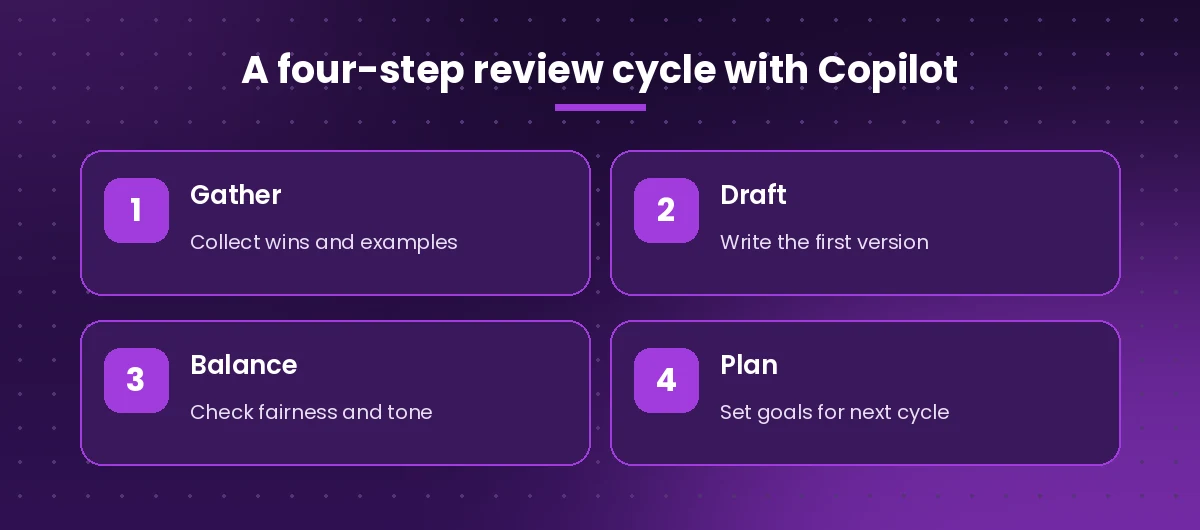
The written review is only half the process. The meeting is where it is understood or misunderstood, so it pays to run a copilot prompt for performance review prep request first.
17. Plan the meeting agenda
Create a 45-minute agenda for a performance review conversation with [name]. Include time for their reflections first, my feedback, discussion of the rating, goals for next cycle, and open questions. Add two open-ended questions for each section.18. Anticipate pushback
Here is the review I wrote for [name]: [paste]. Predict the three points they are most likely to disagree with and why. For each, suggest how I can respond calmly, what evidence to reference, and when to say I will look into it further.19. Prepare as the employee
My manager's review says: [paste key points]. Help me prepare for the review meeting. List questions I should ask to understand the feedback, points where I can add context with evidence, and a short, non-defensive way to raise one point I disagree with.20. Write the follow-up email
Draft a short follow-up email after my performance review with [name]. Summarize what we agreed: [paste notes]. Include the goals, next check-in date and any support I committed to. Tone: warm and clear. Under 150 words.You can draft this directly in Outlook. Our guide to Copilot prompts for Outlook has more templates for follow-ups and summaries.
Prompts for HR and Calibration
HR partners and team leads often need a wider view across many reviews. Use each copilot prompt for performance review calibration template carefully, and only with data you are permitted to process.
21. Summarize themes across reviews
Here are anonymized review summaries for a team of twelve: [paste]. Identify the most common strengths, the most common development areas, and any skills gaps that suggest training needs. Do not refer to individuals.22. Spot biased language
Review the text below for language that could reflect bias, such as personality-based criticism ("abrasive", "emotional"), comments about age or family, or praise focused on effort rather than results. Suggest neutral, behavior-based alternatives for each example.

[paste review text]
23. Prepare calibration notes
I am presenting my team's ratings in a calibration meeting. For each person below, write a two-sentence rationale that ties the proposed rating to evidence. Then list the one question I am most likely to be asked about each rating.

[paste names, ratings and evidence]
24. Create a review template
Create a performance review template for [department] with sections for goals, competencies ([paste list]), rating with rationale, strengths, development areas and next-cycle goals. Add one guidance sentence under each heading explaining what a good answer includes.Our broader list of Copilot prompts for HR covers hiring, onboarding and policy writing if you support the full employee lifecycle.
Prompts for Polishing the Final Draft
Once the content is right, a final copilot prompt for performance review editing pass makes the review easier to read.
25. Tighten and clarify
Edit this review for clarity and length. Cut repetition, replace jargon with plain words, keep every specific example, and bring it under [word limit] words. Do not change the meaning of any feedback or the rating.

[paste review]
26. Adjust tone for the reader
Rewrite this paragraph so it is direct but encouraging. The reader is a [junior / senior] employee who responds well to [clear expectations / collaborative language]. Keep the core message exactly the same.

[paste paragraph]
Comparing Review Tasks and the Best Copilot Tool for Each
Different parts of the job suit different Copilot experiences. Availability depends on your license and admin settings.
| Task | Best place to use Copilot | Why |
|---|---|---|
| Recalling a year of work | Copilot Chat with work data | Can search emails, meetings and files you have access to |
| Drafting the review | Copilot in Word | Drafts from notes and referenced files in a document |
| Rewriting feedback | Copilot in Word or Chat | Fast tone, length and clarity edits |
| Meeting follow-up | Copilot in Outlook | Drafts and refines the recap email |
| Theme analysis | Copilot in Excel or Chat | Summarizes anonymized data and patterns |
Privacy, Fairness and Good Judgment
Performance reviews contain sensitive personal information, so a few rules are worth following every time.
- Use your work account. Microsoft 365 Copilot with a work or school account applies your organization’s security and compliance settings. Microsoft documents how prompts and responses are handled in its Microsoft 365 Copilot privacy overview. Avoid pasting employee data into consumer AI tools.
- Follow your company policy. Some organizations limit how AI can be used for evaluations. Check with HR before you start.
- Never let Copilot pick the rating. Ask it to organize evidence and explain a rating you chose, not to decide one.
- Verify every fact. Copilot can misattribute work or merge two projects. If you cannot confirm a point, delete it.
- Keep the voice human. Edit the draft so it sounds like you. Employees notice when a review reads like a template.
Common Mistakes to Avoid
Even with strong templates, a few habits weaken AI-assisted reviews.
- Prompting with no evidence. If your copilot prompt for performance review request gives Copilot nothing but a name and a job title, you will get generic praise. Always attach or paste real notes.
- Accepting the first draft. Ask follow-up questions such as “what is missing?” or “which claims lack an example?” before you edit.
- Copying the same structure for everyone. Similar reviews make it look like you did not look closely at each person. Vary the emphasis based on what actually happened.
- Leaving recency bias in place. Ask Copilot to organize evidence by quarter so the last month does not dominate.
- Skipping the conversation prep. A polished document still needs a thoughtful discussion.
Final Thoughts
The right copilot prompt for performance review writing does not replace your judgment. It removes the slow parts so you can spend your time on the parts that matter: being fair, being specific and helping someone grow. Start with the evidence prompts, draft with clear criteria, check for balance and bias, and finish with a plan for the next cycle. Save every copilot prompt for performance review template you use most so next year’s review season starts with a head start instead of a blank page.
Frequently Asked Questions
Can Copilot write my performance review for me?
A copilot prompt for performance review drafting can produce a review from the notes, files and criteria you give it, but you should treat the result as a first draft. Check every claim, add specific examples, and make sure the final version reflects your own judgment and voice.
What is the best Copilot prompt for a self-assessment?
The most reliable copilot prompt for performance review self-assessments starts by asking Copilot to list your projects and outcomes for the review period, then ask it to map them to your company’s competencies, and finally draft a balanced self-assessment with accomplishments, growth areas and next-year goals.
Is it safe to put employee information into Copilot?
Use Microsoft 365 Copilot with your work account, which follows your organization’s security and compliance settings, and follow your company’s AI policy. Avoid pasting employee data into consumer AI tools.
How do I stop Copilot from inventing achievements or numbers?
Give it real source material, tell it not to invent figures, and ask it to insert a placeholder such as [ADD METRIC] where data is missing. Then verify each statement against your records.
Can Copilot help me give negative feedback?
Yes. Describe the issue, one concrete example and the impact, then ask Copilot to phrase it in a direct, respectful way with a clear expectation for improvement. Review the tone yourself before sharing it.
Should Copilot decide an employee’s rating?
No. The rating should come from your assessment of the evidence and your company’s framework. Copilot is useful for organizing that evidence and helping you explain the rating clearly.