GitHub Copilot Prompts for Unit Tests: 24 Proven Templates for Better Coverage
GitHub Copilot prompts for unit tests can turn a dreaded chore into a ten-minute task, but only if you tell Copilot exactly what to test, which framework to use and what “done” looks like. This guide gives you 24 copy-ready templates for generating new tests, covering edge cases, mocking dependencies, fixing failing tests and raising coverage on legacy code, plus the setup that keeps every generated test consistent with your project.
Most developers have tried typing “write tests for this” into Copilot Chat before learning what good GitHub Copilot prompts for unit tests look like. The result is usually a handful of happy-path checks that pass on the first run and prove very little. The templates below fix that by adding scope, scenarios and rules to every request.
Where Copilot Can Write Tests for You
Copilot can help with testing in several places, and each one sees a different amount of your code. Pick the surface that matches the job, because the same GitHub Copilot prompts for unit tests behave differently in each one.
- Inline chat in the editor. Select a function, open inline chat and ask for tests. This is the fastest option for a single method.
- Copilot Chat panel. Better for larger requests. You can attach files with references like
#fileor#selectionin VS Code so Copilot reads both the code under test and an existing test file for style. - The
/testsslash command. In Copilot Chat,/testswrites tests for the active file or selected code. GitHub’s own guide to prompts for Copilot Chat shows you can add requirements after it, such as the framework or a specific rule. - Agent mode. In supported editors, agent mode can create test files, run your test command in the terminal and iterate on failures. You still approve the commands and review the changes.
Feature names, commands and availability vary by editor, plan and organization policy. If something below is missing in your setup, check your IDE’s Copilot documentation or ask your admin.
Why Simple Test Requests Fall Short
A one-line request leaves Copilot guessing about everything that matters in a test suite. It does not know your framework conventions, which behaviors are important, which dependencies should be mocked or whether you care about error paths.
The guesses tend to fail in predictable ways:
- Mirror tests. The assertions simply restate what the code currently does, so a bug gets locked in as “expected” behavior.
- Happy path only. Empty inputs, nulls, boundaries and exceptions are skipped.
- Wrong tools. You use pytest, Copilot writes
unittest. You use Vitest, Copilot imports Jest. - Over-mocking. Everything is mocked, including the logic you actually wanted to verify.
Well-structured GitHub Copilot prompts for unit tests prevent each of these problems before the first line of test code appears.
The Anatomy of GitHub Copilot Prompts for Unit Tests
The most reliable GitHub Copilot prompts for unit tests follow the same five-step pattern. Treat it as a checklist rather than a rigid formula.
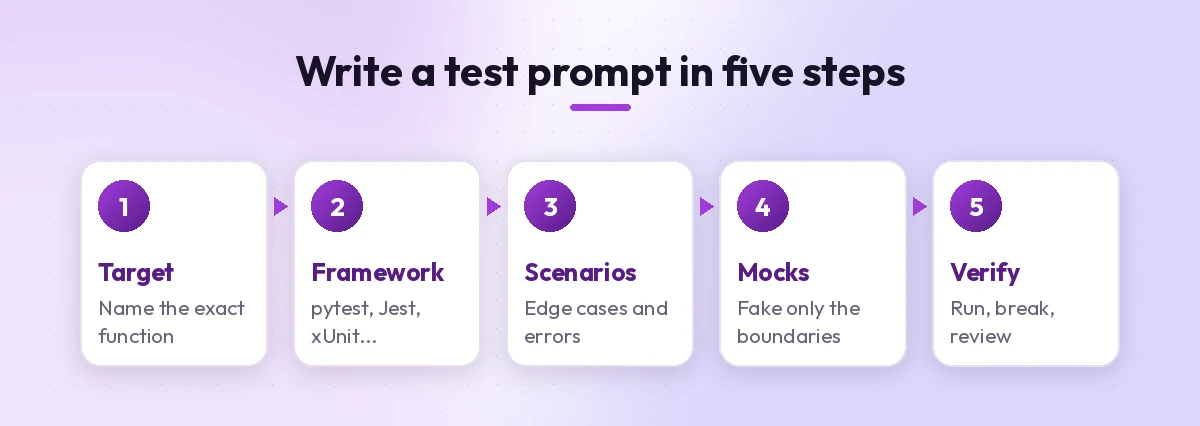
- Target. Name the exact function, class or file. Smaller targets give sharper tests.
- Framework. State the test runner, assertion library and language version, for example “pytest 8 with Python 3.12” or “Jest with TypeScript”.
- Scenarios. List the behaviors that matter: normal cases, edge cases, invalid input and exceptions.
- Mocks. Say what is an external dependency (database, HTTP client, clock, file system) and what should run for real.
- Verify. Ask Copilot to explain each test’s intent, then run the suite yourself.
If you want a deeper look at structuring requests this way, our guide on how to write Copilot prompts covers the same principles for every Copilot product.
Starter Templates for New Tests
Use these GitHub Copilot prompts for unit tests when a function has no tests yet. Replace anything in square brackets with your own details.
1. The complete first suite
Write unit tests for [function name] using [framework]. Cover normal inputs, boundary values, empty or null input and every exception the function can raise. Use one assertion focus per test and descriptive test names.2. Match my existing style
Using #file:[existing test file] as the style reference, write tests for #selection. Follow the same naming pattern, fixtures, folder layout and assertion style. Do not add new libraries.Pointing Copilot at a real test file is one of the simplest ways to get consistent output, because it can copy your conventions instead of inventing new ones.
3. Slash command with rules
/tests using pytest. Use parametrize for input variations, avoid network calls and keep each test under 15 lines.4. Behavior list before code
Before writing any tests, list the behaviors [function name] should have, based on its code and docstring. Mark which ones are already covered by [test file]. Wait for my confirmation, then write tests only for the uncovered behaviors.This two-step approach is slower by a minute but saves far more than that. You get to correct a wrong assumption before it turns into twenty lines of misleading assertions.
Edge Case and Boundary Prompts
Edge cases are where real bugs hide, and they are also what quick requests skip. The GitHub Copilot prompts for unit tests in this section push the assistant past the obvious.
5. Boundary hunter
Identify the boundary values for [function name], such as zero, negative numbers, maximum lengths, empty collections and off-by-one limits. Write a parametrized test that checks each boundary with the expected result.6. The hostile input test
Write tests that pass unexpected input to [function name]: wrong types, very long strings, special characters, Unicode, whitespace-only values and None/null. Assert the function either handles each one or raises the documented error.7. Exceptions and error messages
List every error path in [function name]. For each, write a test that triggers it and asserts both the exception type and the important part of the error message.8. Date and time traps
Write tests for [function name] that cover time-related edge cases: leap years, month ends, daylight saving changes and different time zones. Freeze or inject the clock instead of using the real current time.Mocking and Dependency Prompts
Unit tests should be fast and isolated. When your code talks to a database, an API or the file system, your GitHub Copilot prompts for unit tests need clear instructions about what to fake.
9. Mock only the boundaries
Write unit tests for [class name]. Mock only external dependencies: [list, e.g. the HTTP client and repository]. Keep business logic real. Show the mock setup once in a fixture and reuse it.10. Verify interactions
Add tests that confirm [function name] calls [dependency] with the correct arguments, calls it exactly once on success and does not call it when validation fails.11. Simulate failures
Write tests where [dependency] times out, returns an error status or raises an exception. Assert that [function name] retries, logs or returns the fallback value as designed.12. Refactor for testability
This function is hard to test because it creates its dependencies internally. Suggest the smallest refactor to inject [dependency], show the updated signature, then write tests using a fake implementation.The last template is worth keeping close. Often the reason tests are painful is the design, not the testing tool, and Copilot can propose a minimal change that makes isolation possible.
Framework-Specific Templates
Naming the framework is the single biggest quality jump for any test prompt. Here are ready GitHub Copilot prompts for unit tests in popular stacks. Swap in your own names.
| Stack | What to mention in the prompt | Useful extras |
|---|---|---|
| Python | pytest, fixtures, parametrize | monkeypatch, tmp_path |
| JavaScript / TypeScript | Jest or Vitest, describe/it blocks | jest.fn or vi.fn mocks, fake timers |
| C# / .NET | xUnit, NUnit or MSTest | Moq or NSubstitute, Theory data |
| Java | JUnit 5, AssertJ | Mockito, ParameterizedTest |
| Go | testing package, table-driven tests | t.Run subtests, interfaces for fakes |
13. Python with pytest
Write pytest tests for [module]. Use fixtures for shared setup, pytest.mark.parametrize for input variations, pytest.raises for errors and monkeypatch instead of patching globals.14. TypeScript with Jest or Vitest
Write [Jest/Vitest] tests in TypeScript for [function]. Group them with describe blocks by behavior, use fake timers for anything time-based and type all mocks properly. No "any" types.15. C# with xUnit
Write xUnit tests for [class]. Use [Theory] with InlineData for variations, Moq for [interface] and the Arrange-Act-Assert layout with a blank line between each section.16. Go table-driven tests
Write table-driven tests for [function] in Go. Each case needs a name, input, expected output and expected error. Run cases with t.Run and compare errors with errors.Is.Visual Studio users working in .NET should also look at the built-in testing features Microsoft has been adding alongside Copilot, since they can generate, run and debug tests inside Test Explorer.
Prompts for Legacy Code and Coverage Gaps
Old code without tests is risky to change. These GitHub Copilot prompts for unit tests help you build a safety net before you refactor.
17. Characterization tests
This legacy function has no tests and no documentation. Write characterization tests that capture its current behavior for typical inputs, including any odd behavior. Add a comment on tests where the behavior looks like a bug.Characterization tests describe what the code does today, not what it should do. They let you refactor safely and spot accidental changes. Just remember to review the “looks like a bug” comments with your team.
18. Fill coverage gaps
Here is the coverage report for [file]: [paste uncovered lines or branches]. Write tests that exercise only those lines and branches. Explain which condition each new test triggers.19. Branch-by-branch
Walk through each if/else and switch branch in [function]. For every branch, write one test that reaches it and asserts the outcome. Show a small table mapping branch to test name.20. Test before refactor
I plan to refactor [function] to [goal]. First write tests that lock in its public behavior so I can confirm nothing changes. Do not test private helpers directly.Fixing and Improving Existing Tests
Generated tests are only the starting point. Use these GitHub Copilot prompts for unit tests that already exist but fail, flake or prove nothing.
21. Explain the failure
This test fails with the output below. Explain whether the bug is in the test or in the code under test, and propose the smallest fix. Do not change the assertion unless the expected value is wrong.
[paste failure output]
That last instruction matters. Without it, an assistant may “fix” a test by changing the expectation to match buggy output.
22. Hunt flaky tests
Review these tests for sources of flakiness: shared state, test order dependence, real time, randomness, network calls and async timing. List each risk and rewrite the affected tests to be deterministic.23. Strengthen weak assertions
Review this test file for weak tests: tests with no assertions, assertions that only check "not null", duplicated scenarios and names that do not describe behavior. Rewrite them and explain each change.24. Mutation-style review
Imagine three small bugs someone could introduce into [function], such as flipping a comparison or removing a null check. Would the current tests catch each one? If not, add the missing tests.Template 24 is a quick, manual take on the idea behind mutation testing. It is a good way to judge whether your suite actually protects you.
Make Copilot Follow Your Testing Rules Automatically
Typing the same framework and style rules into all your GitHub Copilot prompts for unit tests gets old fast. A repository instructions file lets Copilot pick up those rules on its own.
Add a section like this to .github/copilot-instructions.md:
## Testing
- Use pytest with fixtures in tests/conftest.py.
- Name tests test_<behavior>_<condition>_<expected>.
- Mock only network, database and clock. Never mock the module under test.
- Every bug fix needs a regression test.
- Prefer parametrize over copy-pasted test cases.
Our guide to the Copilot instructions file explains where this file lives and how Copilot uses it. For prompts you reuse often, such as template 1 or 22, consider saving them as Copilot prompt files so the whole team runs the same version.
A Practical Workflow From Function to Merged Test
GitHub Copilot prompts for unit tests work best inside a repeatable routine. Here is a simple loop that fits most teams:
- Select the target and ask for a behavior list (template 4).
- Generate tests with the framework named and your style file attached.
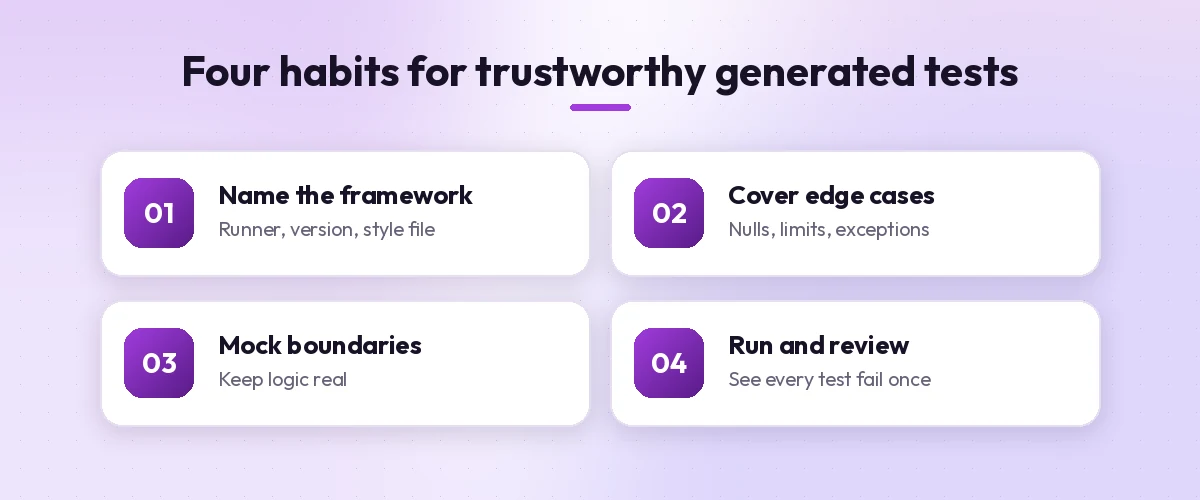
- Run the suite locally. Never trust tests you have not seen pass, and ideally seen fail.
- Break the code on purpose. Change one line in the function and confirm at least one test fails.
- Review like production code. Check names, mocks and assertions. Our Copilot prompt for code review templates work well for this step.
- Commit tests with the change, so reviewers see both together.
GitHub’s tutorial on writing tests with GitHub Copilot walks through a similar process with unit and integration test examples, and notes that complex scenarios need more detailed prompts.
Common Mistakes to Avoid
Even with strong GitHub Copilot prompts for unit tests, a few habits undermine generated test suites:
- Accepting tests that pass on the first run without checking. A test that cannot fail is not a test.
- Testing implementation details. Tests tied to private methods break on every refactor. Ask for tests of public behavior.
- Letting Copilot invent APIs. Generated code can call methods that do not exist in your version of a library. Run the tests before trusting them.
- Pasting secrets into prompts. Use fake data and placeholder credentials in test fixtures.
- Chasing coverage numbers alone. High coverage with weak assertions still lets bugs through.
For more coding-focused templates beyond testing, browse our full collection of GitHub Copilot prompts.
Final Thoughts
Copilot is fast at producing test code, but speed is not the same as protection. The value comes from your instructions: a named framework, a clear list of scenarios, sensible mocking rules and a habit of running and breaking every test before you trust it.
Start with the complete first suite template on one function today, add a testing section to your instructions file this week, and save your favorite GitHub Copilot prompts for unit tests as shared prompt files. Within a few sprints, writing tests stops feeling like a tax and starts feeling like part of how you build.
Frequently Asked Questions
What is the best prompt for GitHub Copilot to write unit tests?
The best GitHub Copilot prompts for unit tests name the exact function, the test framework, the scenarios to cover (normal, boundary, invalid input and exceptions) and what to mock. For example: “Write pytest tests for calculate_total covering empty carts, negative prices and rounding, and mock the tax service.”
How do I use the /tests command in Copilot Chat?
Select the code or open the file you want to test, then type /tests in Copilot Chat. You can add requirements after the command, such as “/tests using Jest” or “/tests ensure the function rejects an empty list”. Review and run the generated tests before committing them.
Can GitHub Copilot write tests before the code exists?
Yes. For test-driven development, skip the /tests command and describe the behavior you want instead, for example “Add tests for a function that should sum a list of integers and reject non-numeric values.” Then write the code until the tests pass.
Are tests generated by Copilot reliable?
They are a useful starting point, not a guarantee. Generated tests can miss edge cases, mock too much or simply mirror buggy behavior. Run them, deliberately break the code to confirm they fail, and review them like any other code.
How can I make Copilot use my team’s testing conventions?
Attach an existing test file as a style reference in your prompt, and add a testing section to your repository’s .github/copilot-instructions.md file with your framework, naming pattern and mocking rules. Copilot can then apply those rules automatically.
Can Copilot help increase code coverage on legacy code?
Yes. Paste the uncovered lines or branches from your coverage report and ask Copilot to write tests that exercise only those paths. For code with no tests at all, start with characterization tests that capture current behavior before you refactor.
One Comment