Best Prompts for Microsoft Copilot Researcher: 35 Proven Prompts for Deep Reports
The best prompts for Microsoft Copilot Researcher read less like a quick question and more like a short brief you would hand to a sharp analyst. Researcher is the agent inside Microsoft 365 Copilot built for multi-step investigation: it reads across your files, emails, meetings and chats, searches the web, reasons for several minutes and comes back with a structured report full of citations. Give it a vague one-liner and you get a long, polite, generic document. Give it a goal, a scope and a shape, and it can save you an afternoon of digging.
This guide explains when Researcher is the right tool, how to write a strong research brief, and then gives you 35 copy-ready prompts grouped by the kind of work you are doing. Every prompt has placeholders in square brackets, so swap in your own projects, people and dates before you run it.
What the Researcher Agent Actually Does
Researcher sits under Agents in the Microsoft 365 Copilot app. According to Microsoft’s own Researcher agent overview, it is designed for complex, multi-step tasks and returns source-cited reports with organised sections and, where useful, charts and visuals. At work, it only sees content you already have permission to open, and it follows the same compliance policies as the rest of Copilot.
Three behaviours make it different from a normal chat reply:
- It takes its time. A report can take several minutes because the agent plans, searches, reads and revises before answering.
- It asks before it digs. Researcher often comes back with clarifying questions. Your answers steer the whole report, so treat them as part of the prompt.
- It mixes sources. It can blend your organisation’s content with public web results, and you can push it toward one side or the other.
Access and usage limits depend on your licence and your admin’s settings, so if you do not see Researcher in your agent list, check with IT before assuming it is missing.
Copilot vs Researcher: Which One Should You Use?
People often ask whether they need Researcher at all, since standard Copilot Chat can already search and summarise. The short answer is that they suit different jobs.
| You need | Better choice | Why |
|---|---|---|
| A quick summary, short reply or rough idea list | Copilot Chat | Fast, conversational, good enough for light tasks |
| A report that pulls from many files, threads and websites | Researcher | Plans a multi-step search and reasons across sources |
| Citations you can show a manager or client | Researcher | Every section links back to its sources |
| A back-and-forth editing session | Copilot Chat | Researcher is built for one deep pass, not rapid edits |
| A decision brief with options and trade-offs | Researcher | Longer reasoning produces clearer comparisons |
A useful rule: if you would normally block out an hour to read, compare and write it up, try Researcher. If it would take you five minutes, stay in Copilot Chat. For more everyday agent ideas, our Copilot agent prompt examples cover the lighter end.
How to Write the Best Prompts for Microsoft Copilot Researcher
Microsoft’s guidance boils down to three points: be specific, define your search scope and engage with the clarifying questions. In practice, a strong brief has six parts. You do not need all six every time, but the more you include, the less the agent has to guess.
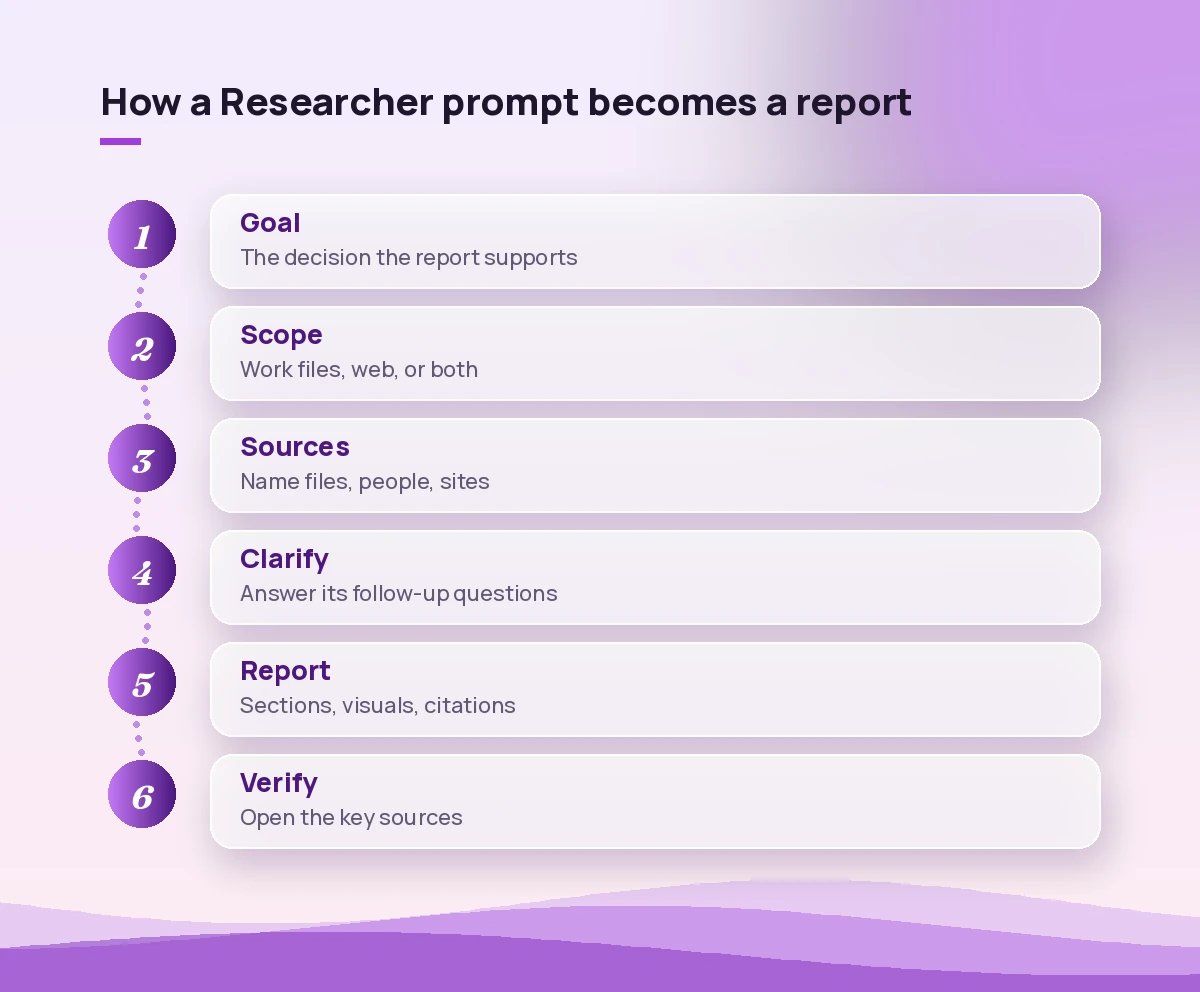
- Goal. What decision or task will this report support? “Help me decide whether to renew the vendor contract” beats “research our vendor”.
- Scope. Work content only, web only, or both. Say it plainly.
- Sources. Name specific files, people, meetings, sites or time periods. In the Copilot app you can type
/to reference a file, email or meeting directly. - Time frame. Research drifts without dates. “Since January 2026” or “the last two quarters” keeps it focused.
- Output shape. Sections, length, a table, an executive summary at the top, a list of open questions at the end.
- Honesty rules. Ask it to flag gaps, conflicting sources and anything it could not verify.
These are the same building blocks covered in our guide to Copilot prompt ingredients, stretched for a longer, deeper task. Here is a reusable template that pulls them together:
Goal: I need to [decision or task] by [date].
Scope: Use [my work content / the web / both].
Sources: Focus on [files, people, meetings, sites]. Ignore [anything out of scope].
Time frame: [period].
Output: Start with a 5-bullet executive summary, then [sections]. Keep it under [length].
Rules: Cite every claim. List gaps, conflicting sources and anything you could not confirm.
Prompts for Market and Industry Research
Web-heavy research is where Researcher feels most like a junior analyst. Keep the question narrow and the output structured, and you will get something you can actually present.
1. Market snapshot
Research the [industry] market in [region] using web sources from the last 12 months. Cover market size estimates (with the source of each estimate), main growth drivers, key risks and the five most-cited players. Where sources disagree on a number, show each figure and its source instead of averaging them.2. Trend scan
Find the most important trends affecting [industry] in [year]. For each trend give a one-paragraph explanation, two credible sources, and one practical implication for a company like ours: [one-line company description]. Rank the trends by how likely they are to affect us in the next 12 months.3. Customer pain points
Using public reviews, forums and industry articles, summarise the top recurring complaints customers have about [product category]. Group them into themes, quote short representative examples with links, and note which themes appear most often.4. Regulation check
Summarise current and upcoming regulations that affect [activity] in [country or region]. Use official government or regulator sources where possible. Present a table with the rule, who it applies to, effective date and a plain-English summary. Flag anything still in draft.5. Market entry brief
I am preparing a short brief on whether we should enter [market]. Combine web research with our internal documents on [topic]. Structure it as: opportunity, competition, risks, what we already know internally, and three open questions we need answered before deciding.If market work is a big part of your job, pair these with our Copilot prompts for market research, which focus on faster, chat-sized tasks.
Prompts for Competitor Analysis
Competitor research benefits from a fixed comparison frame. Without one, each company gets described differently and the report is hard to compare.
6. Competitor profile
Build a profile of [competitor] using public web sources. Cover products, pricing model (only if published), target customers, recent announcements from the last six months and notable hiring or partnership news. Cite each point and mark anything older than a year.7. Side-by-side comparison
Compare [our product] with [competitor A], [competitor B] and [competitor C] on these criteria: [criteria list]. Use our internal product docs for our side and public sources for theirs. Output a comparison table, then a short section on where we are clearly stronger and clearly weaker.8. What our team already knows
Search my emails, Teams chats and meeting notes from the last 90 days for mentions of [competitor]. Summarise what colleagues have said about them, who said it and in which conversation, and highlight any deals we won or lost against them.9. Positioning gaps
Review how [competitor A] and [competitor B] describe themselves on their websites and in recent press releases. Identify messages they both use, messages only one uses and angles neither of them claims. Suggest two positioning angles we could own, with reasoning.10. Win/loss pattern
Look through our CRM notes, sales emails and call summaries that I have access to about deals involving [competitor]. Identify recurring reasons we won or lost. Present the top five reasons with example references, and note how confident you are in each pattern.Prompts for Internal Projects and Work History
This is where Researcher earns its place for many teams. It can reconstruct a project’s story from scattered threads far faster than you can scroll.
11. Project history
Create a timeline of the [project name] project from [start date] to today using my emails, meetings, chats and files. Include key decisions, who made them, scope changes and missed or moved deadlines. Link each entry to its source.12. Catch me up
I am joining the [project or team] next week. Using the work content I can access, explain the goal, current status, main stakeholders, open risks and the three documents I should read first. Keep it under 600 words.13. Decision trail
Why did we decide to [decision]? Search meetings, emails and documents about this topic. Summarise the options discussed, the arguments for and against each, who supported which option and where the final decision was recorded.14. Open issues sweep
Find unresolved issues, unanswered questions and pending approvals related to [project] across my email, Teams and shared files from the last 30 days. Group them by owner and suggest which three to follow up on first.15. Lessons learned
Draft a lessons-learned review for [completed project]. Use project files, retrospectives, status reports and related emails. Cover what went well, what went poorly, root causes where they are documented and five recommendations for the next similar project.16. Policy finder
What is our current internal guidance on [topic, e.g. travel approvals]? Search SharePoint, policy documents and official announcements. Quote the relevant sections with links, note the version date and flag if older documents say something different.Prompts for Decision Briefs and Strategy
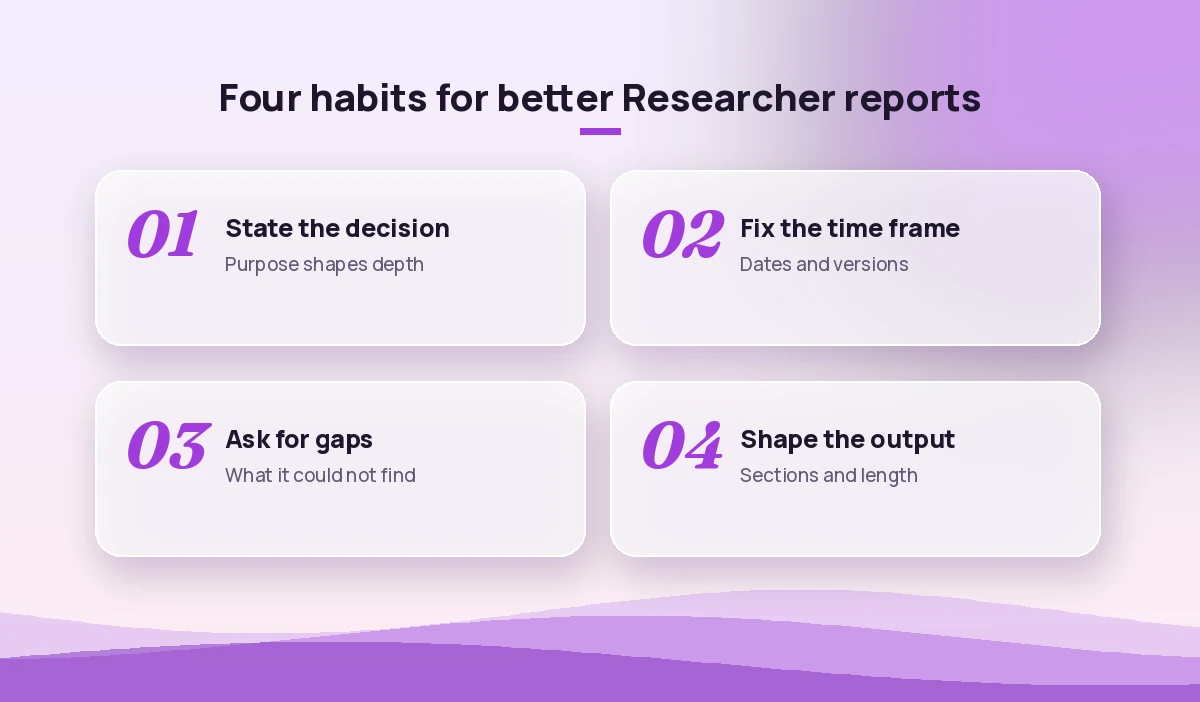
Decision prompts work best when you tell Researcher what options exist and what matters most. Otherwise it may invent options you have already ruled out.
17. Options paper
I need to choose between [option A], [option B] and [option C] for [goal]. Using internal documents and web sources, compare cost, effort, risk and expected benefit. End with a recommendation and the main assumption that would change it.18. Build vs buy
Research whether we should build or buy a solution for [need]. Summarise what our internal requirements documents say, list three to five commercial products that fit, and compare them in a table. Do not quote prices unless the vendor publishes them.19. Risk register
Create a risk register for [initiative]. Use our planning documents and relevant industry sources. For each risk give a description, likelihood, impact, an existing mitigation if one is documented, and a suggested owner role.20. Pre-mortem
Imagine [initiative] has failed one year from now. Using what our documents and meetings say about its plan, list the most likely reasons it failed, supported by evidence from our content or credible outside examples. Suggest an early warning sign for each.21. Strategy one-pager
Turn my research notes in [file] and the related email threads into a one-page strategy summary: situation, objective, three strategic choices, key metrics and next steps. Write for a busy executive audience.Prompts for People, Customers and Meetings
These prompts combine relationship context from your mailbox and calendar with public information, which makes them handy before important conversations.
22. Meeting prep
Prepare me for my meeting with [person or company] on [date]. Summarise our previous meetings, recent emails, open commitments on both sides and relevant public news about them from the last three months. End with five questions I should ask.23. Account review
Build an account summary for [customer]. Include our history with them, current projects, issues raised in the last six months, key contacts I have worked with and public news about their business. Highlight anything that looks like renewal risk.24. Stakeholder map
Who are the main stakeholders for [initiative]? Based on meetings, emails and documents, list each person, their role, their stated concerns and how involved they have been. Present it as a table and note anyone who seems to be missing from discussions.25. Customer feedback synthesis
Pull together customer feedback about [product or feature] from support summaries, survey files and emails I can access. Group feedback into themes, count how often each theme appears in the sources you found, and include two short quotes per theme with links.Prompts for Reports, Learning and Writing
Researcher is not a writing tool first, but its reports make excellent raw material. Ask for structure that matches where the content will end up.
26. Report draft
Write a research report on [topic] for [audience]. Sections: summary, background, findings, implications, recommendations, sources. Use both web and work content. Keep each section under 250 words and include at least one table.27. Literature-style review
Find credible, recent sources on [topic], prioritising official documentation, academic or industry research and reputable publications. Summarise what each source says, where they agree, where they disagree and what remains uncertain.28. Explain a new area
I am new to [topic]. Explain it in plain language, then cover key terms, common approaches, typical mistakes and how it applies to our work on [project]. Point me to the five best sources to read next.29. Fact-check a draft
Check the factual claims in [document]. For each claim, say whether you found supporting sources, conflicting sources or nothing at all, and link to what you found. Do not rewrite the document; only report on the claims.30. Newsletter roundup
Find the most relevant news about [topic] from the last two weeks. Pick the six most important items, write a two-sentence summary of each with a link, and add one line on why it matters to [team or audience].When you are ready to turn the findings into a polished document, our Copilot prompts for report writing help with tone, structure and editing.
Follow-Up Prompts That Improve Any Report
The first report is rarely the final one. These follow-ups help you tighten, challenge and reshape it.
31. Close the gaps
List the questions this report did not answer well and the sources you could not access or find. Then research the two most important gaps and add a short section for each.32. Challenge the conclusion
Argue against the main recommendation in this report. What evidence would support a different conclusion? Rate how strong each counter-argument is.33. Source quality check
Rate each source used in this report as primary, secondary or opinion, and note its publication date. Flag any important claim that depends on a single weak or outdated source.34. Executive version
Rewrite this report as a 200-word executive summary with three bullet-point recommendations and one sentence on the biggest risk. Keep the citations for the key claims.35. Turn it into actions
Convert the findings of this report into an action plan: tasks, suggested owner roles, rough effort (small, medium, large) and a sensible order. Mark which tasks depend on information we still need.Answering Researcher’s Clarifying Questions
Many users skip past the clarifying questions with a quick “just go ahead”. That is usually a mistake. The questions show you how the agent has understood your request, and a thirty-second answer can change the direction of a ten-minute report.
Good answers are short and specific:
- Narrow the audience: “This is for our regional sales leads, not the board.”
- Confirm or cut sources: “Use the Q3 planning deck and the vendor emails. Skip public news.”
- Set depth: “Keep it to the top three options, not an exhaustive list.”
- Add constraints: “Budget is fixed, so do not recommend options that need new headcount.”
If none of its questions fit, say so and restate the goal in one sentence. That alone often sharpens the result.
Common Mistakes With Researcher Prompts
A handful of habits cause most disappointing reports:
- Treating it like search. A three-word query wastes the agent’s planning ability. Write a brief.
- No time frame. Without dates, old documents and current ones get mixed together.
- Asking for everything. “Research our whole business” produces a shallow tour. Pick one question.
- Ignoring permissions. Researcher cannot see files you cannot open. If a key document is missing, check access first.
- Trusting numbers blindly. Always open the cited source for any figure you plan to repeat.
- Using it for quick tasks. For a one-line answer, standard Copilot Chat is faster and leaves your Researcher usage for work that needs it.
How to Check a Researcher Report Before You Share It
A cited report looks authoritative, which is exactly why it deserves a final check. Before you forward it, open the sources behind the three or four claims your reader will rely on most. Confirm dates, check that internal documents are the latest versions and make sure any figures appear in the source as written. If the report mixes web and work content, double-check that nothing confidential ended up in a summary meant for a wider audience.
Used this way, the best prompts for Microsoft Copilot Researcher turn the agent into a reliable first draft of your thinking rather than a black box. Start with one of the prompts above, answer its questions properly, and refine with a follow-up or two. That simple loop is what turns the agent from a novelty into a regular part of how you research.
Frequently Asked Questions
What is the Researcher agent in Microsoft 365 Copilot?
Researcher is an agent in the Microsoft 365 Copilot app built for complex, multi-step research. It combines your work content, such as files, emails, meetings and chats you can access, with web sources, reasons over them for several minutes and returns a structured report with citations.
How is Researcher different from regular Copilot Chat?
Copilot Chat is optimised for speed and suits quick summaries, short replies and brainstorming. Researcher spends longer planning, searching and analysing, so it is better for in-depth reports, comparisons and decision briefs that need citations.
How do I write a good prompt for Copilot Researcher?
Treat the prompt as a brief. State the goal or decision, choose whether to use work content, web sources or both, name key files or people, set a time frame, describe the output structure and ask it to flag gaps and conflicting sources.
Why does Researcher ask me questions before starting?
The clarifying questions help it understand your goal, audience and preferred sources before it begins a long search. Answering them clearly is one of the easiest ways to get a more focused and useful report.
Can Researcher access all of my company’s files?
No. At work, Researcher respects your existing permissions and your organisation’s policies, so it only uses content you are already allowed to open. If an important document is missing from a report, check that you have access to it.
Are Researcher reports always accurate?
Not always. Reports include citations so you can verify them, but the agent can still misread a source, use an outdated file or combine figures incorrectly. Open the sources behind any claim you plan to rely on or share.