Copilot Prompts for Interview Preparation: 40 Proven Templates to Walk In Ready
Copilot prompts for interview preparation turn the scattered work of getting ready for a job interview into a clear, repeatable routine. Instead of rereading the job ad five times and hoping the right stories come to mind on the day, you can use Microsoft Copilot to decode the role, shape your answers, rehearse tough questions and plan your follow-up, all in an afternoon.
This guide gives you 40 copilot prompts for interview preparation as copy-ready templates, grouped by the stage of preparation you are in. They work in Copilot Chat, in Microsoft 365 Copilot inside Word or OneNote, and in the free Copilot app. Replace anything in square brackets with your own details, and keep one rule in mind throughout: Copilot can help you organize and phrase your experience, but every fact you say in the room has to be true.
What Copilot Can and Cannot Do for Interview Prep
Copilot is good at structure. Give it a job description and your resume, and it can map requirements to your experience, suggest likely questions, turn a messy memory into a tidy STAR answer and play the part of an interviewer who keeps asking “why?” It is also patient. You can run the same mock question ten times without anyone getting bored.
It is less reliable on facts it cannot see. If you ask about a company’s recent news, salary bands or the exact interview format, treat the answer as a starting point and confirm it on the company’s own site, recent press releases or people you know there. Copilot with web grounding can surface sources, so ask it to cite them and open the links yourself.
It also cannot know your real achievements. If you ask for “an impressive answer,” it may invent a result you never delivered. The prompts below repeatedly say “use only the facts I provide” for exactly that reason.
Inputs to Gather Before Using Copilot Prompts for Interview Preparation
The quality of every answer depends on what you paste in. Spend ten minutes collecting these before you start, and keep them in one document so you can reuse them across sessions.
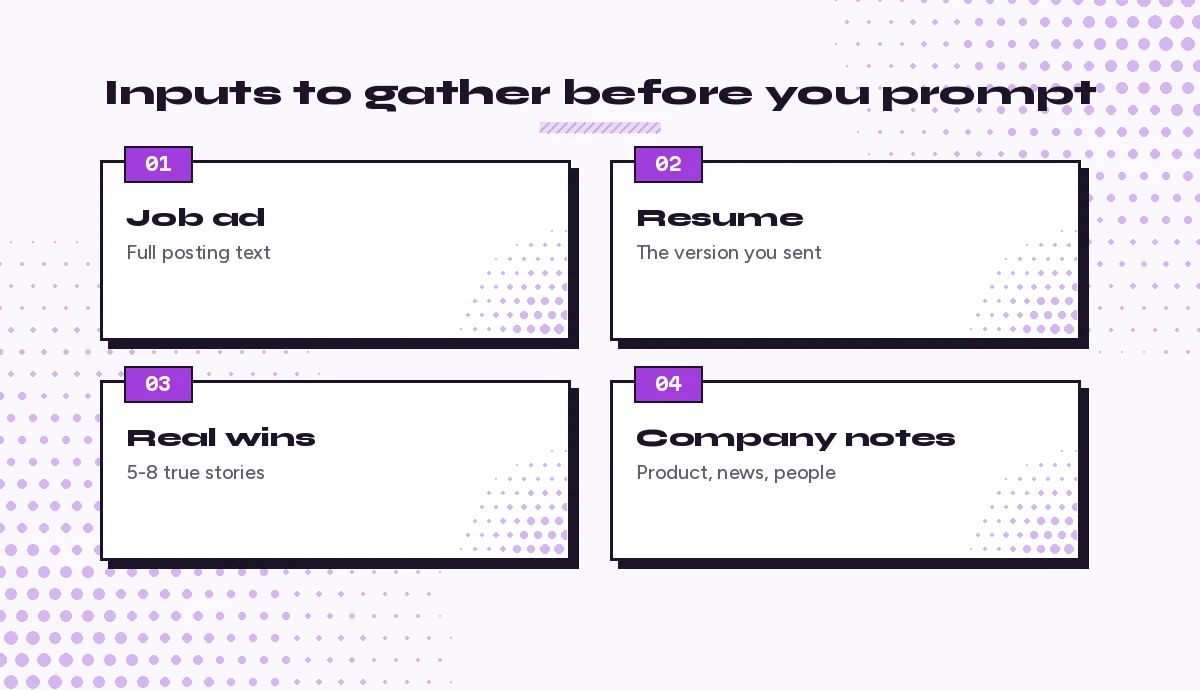
- The full job description. Copy the whole posting, including the “nice to have” section and any details about the team.
- Your current resume. The version you actually sent, so your answers match what the interviewer is holding.
- A list of real wins. Five to eight projects or moments, each with what you did and what changed because of it. Rough notes are fine.
- Company notes. The product, the customers, recent announcements and anything the recruiter told you about the process.
- The interview format. Phone screen, panel, case study, technical test or a mix. Each needs different practice.
If you already used Copilot to tailor your application, our guides on Copilot prompts for resume writing and Copilot prompts for cover letters produce exactly the material these templates build on.
Stage 1: Decode the Role and the Company
Before you rehearse anything, understand what the hiring team is really buying. These prompts help you read between the lines of a posting and walk in with informed opinions.
1. Find the real priorities in the job ad
Here is a job description: [paste]. List the five skills or outcomes this employer cares about most, in order of importance. For each one, quote the phrase from the ad that tells you so, and explain what a strong candidate would be able to show.2. Spot the hidden expectations
Read this job ad again: [paste]. What problems does this team probably need the new hire to solve in the first six months? Base your answer only on clues in the text, and label anything that is a guess.3. Map the role to your experience
Compare this job description [paste] with my resume [paste]. Make a table with three columns: requirement, my matching experience, and gap. Do not invent experience. Where I have a gap, suggest an honest way to talk about related skills.4. Build a company briefing
Give me a one-page briefing on [company name] for a job interview: what it sells, who its customers are, its main competitors, and any significant news from the last year. Cite your sources so I can check them, and flag anything you are unsure about.5. Understand the industry vocabulary
I am interviewing for a [role] in the [industry] sector. List 15 terms or acronyms I am likely to hear, with a one-line plain-English definition of each and an example of how I might use it naturally in an answer.6. Prepare for the people in the room
My interviewers are [names and job titles, from the invite or LinkedIn]. For each person, suggest what they will probably care about most in this hire and one question I could ask that would be relevant to their role.Stage 2: Shape Your Story
The opening question, in some form, is almost always “tell me about yourself.” A clear two-minute story sets the tone for everything after it. Use these templates to build it, then trim it until it sounds like you talking rather than a press release.
7. Draft your two-minute introduction
Using only the facts in my resume [paste], write a spoken introduction of about 250 words for an interview for [role] at [company]. Structure it as: where I am now, two achievements that matter for this role, and why this job is the logical next step. Use short sentences I can say out loud.8. Make it sound like you
Here is my draft introduction [paste] and two examples of how I normally write [paste]. Rewrite the introduction to match my natural tone and vocabulary. Remove anything that sounds rehearsed or corporate.9. Explain a career change
I am moving from [old field] to [new field]. Write three honest ways to explain this change in an interview, each in under 80 words, connecting skills from my past work [list] to what this role needs [list].10. Handle a gap on your resume
I have a gap from [dates] because [reason, as much as you are comfortable sharing]. Suggest a calm, brief way to explain it in an interview, then a sentence that moves the conversation back to my skills. Keep it truthful and avoid oversharing.11. Answer “Why do you want this job?”
Based on this job ad [paste] and my notes about why I applied [paste], write three different answers to "Why do you want to work here?" Each should mention one specific thing about the company and one thing about the work itself. Avoid generic praise.Stage 3: Build Behavioral Answers That Hold Up
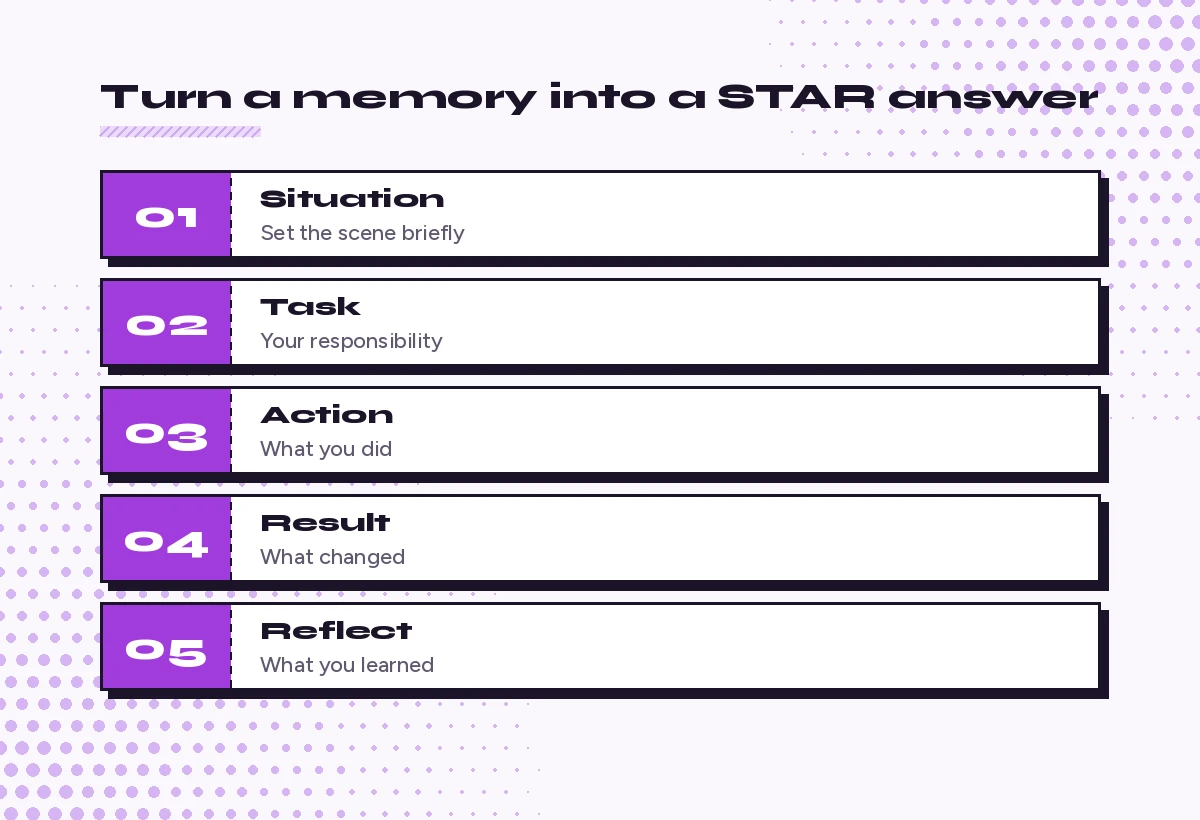
Behavioral questions ask for a past example: “Tell me about a time you handled conflict.” The STAR structure (situation, task, action, result) keeps answers focused, and Copilot is very good at sorting your memories into it. The key is feeding it real details, then checking that the result still matches what happened.
12. Predict the behavioral questions
For a [role] position with these requirements [paste the top five from prompt 1], list 12 behavioral interview questions I am likely to be asked. Group them by the skill they test.13. Turn notes into a STAR answer
Here are my rough notes about a project: [paste]. Turn them into a STAR answer of 180 to 220 words. Use only the facts I gave you. Keep the action section the longest, and use "I" for what I did personally. If a result is missing, leave a placeholder instead of making one up.14. Strengthen a weak result
This answer ends with a vague result: [paste]. Ask me five questions that would help me find a concrete outcome, such as time saved, an error avoided, feedback received, or a decision it enabled. Do not suggest numbers yourself.15. Match stories to questions
Here are my six best stories in one line each: [list]. Here are the likely questions: [list]. Match each question to the best story, and point out any question where none of my stories fits well.16. Prepare a failure story
I need an answer to "Tell me about a time you failed." Here is what happened: [paste]. Write a STAR-style answer that owns the mistake clearly, explains what I changed afterward, and ends on what I do differently now. Keep it under 200 words and avoid blaming others.17. Prepare a conflict story
Using this situation [paste], write an answer to "Describe a disagreement with a colleague." Show that I listened, focused on the shared goal, and reached an outcome. Keep the other person anonymous and portray them fairly.18. Cut an answer that runs long
This answer takes about three minutes to say: [paste]. Shorten it to roughly 90 seconds of speech (around 200 words) without losing the specific actions or the result. Then show me what you removed.Stage 4: Role-Specific and Technical Preparation
Every field has its own kind of tough question, so copilot prompts for interview preparation need to reflect your discipline. These templates adapt to almost any role; swap in your discipline and level. For technical roles, use Copilot to practice explaining your reasoning, not to memorize answers you do not understand.
19. Generate role-specific questions
List 10 technical or role-specific questions an interviewer might ask a [seniority] [role] candidate, based on this job ad [paste]. For each, explain what a strong answer would demonstrate.20. Rehearse explaining a concept simply
Ask me to explain [concept, tool or method] as if to a non-specialist manager. After I reply, rate my answer for clarity and accuracy, and suggest one simpler way to phrase the hardest part.21. Walk through a case question
Give me a realistic case interview question for a [role] at a company like [company]. Do not solve it. Let me talk through my approach step by step, and after each step ask one probing question as the interviewer would.22. Practice a portfolio walkthrough
I will present this project in my interview: [short description]. Suggest a five-minute walkthrough structure, the three decisions I should highlight, and the four follow-up questions an interviewer is most likely to ask about it.23. Prepare for a skills test
My interview includes a [type of test, for example an Excel exercise or a writing task]. Create three practice tasks at a realistic difficulty for a [role], with instructions only. I will share my attempts afterward for feedback.Stage 5: Run Mock Interviews With Copilot
Reading answers is not the same as saying them. Mock interviews close that gap, and they are where copilot prompts for interview preparation pay off most. Type your replies, or use voice mode in the Copilot app if you want to practice speaking. Ask for honest feedback; by default Copilot tends to be encouraging, so you need to request criticism explicitly.
24. Start a realistic mock interview
Act as a hiring manager interviewing me for [role] at [company]. Ask one question at a time and wait for my answer. Mix introductory, behavioral and role-specific questions. After eight questions, stop and give me feedback on each answer.25. Play a tougher interviewer
Interview me again, but this time be skeptical. After each answer, ask one follow-up that challenges a weak point, such as a vague result or an unexplained decision. Keep a neutral, professional tone.26. Score my answers
Here is my answer to "[question]": [paste]. Score it from 1 to 5 on relevance, specificity, structure and length. Explain each score in one sentence and suggest one change that would raise the lowest score.27. Catch filler and hedging
Here is a transcript of me answering practice questions out loud: [paste]. Highlight filler words, hedging phrases like "I guess" or "sort of," and sentences that trail off. Suggest a cleaner version of the three weakest sentences.28. Practice the curveball questions
Ask me five unexpected but realistic interview questions, such as "What would your last manager say you need to improve?" or "Why should we not hire you?" After each of my answers, give brief feedback on whether it stayed honest and positive.29. Rehearse a panel interview
Simulate a panel of three interviewers for [role]: a hiring manager, a peer from [team], and someone from HR. Rotate who asks each question, and make each person's questions reflect their role. Stop after nine questions and summarize how I did with each person.Stage 6: Questions to Ask and Practical Details
Interviews end with “Do you have any questions for us?” A thoughtful question shows you have been listening and helps you decide whether you want the job.
30. Write smart questions for the interviewer
Based on this job ad [paste] and what I know about the team [notes], suggest 10 questions I could ask at the end of the interview. Avoid anything answered on the company website. Mark the three best ones for a first-round interview.31. Prepare for the salary question
I may be asked about salary expectations for a [role] in [location]. Help me prepare a polite, flexible answer that gives a range, explains what it is based on, and leaves room to discuss the full package. I will supply the range from my own research: [range].32. Build an interview-day checklist
Create a checklist for my [in-person or video] interview on [date] at [time]: what to prepare the day before, what to bring or have open on screen, a tech check for video calls, and a 10-minute warm-up routine before it starts.33. Make a one-page cheat sheet
Summarize everything we prepared into a one-page review sheet: my introduction in five bullet points, my six stories with one-line reminders, three company facts, and my questions for the interviewer. Format it to fit on one page.Stage 7: After the Interview
Preparation does not stop when the call ends. Notes taken within an hour are far more useful than memories a week later, especially if there is a second round.
34. Capture what happened
Here are my rough notes from today's interview: [paste]. Organize them into: questions I was asked, how I answered, anything the interviewer emphasized, and next steps they mentioned. Flag any answer I should improve before a second round.35. Write a thank-you email
Write a short thank-you email to [interviewer name] after my interview for [role] today. Mention one specific topic we discussed [detail], briefly restate why I am a good fit, and keep it under 120 words. Friendly and professional, not flattering.36. Prepare for the next round
I have passed the first round for [role]. Based on my notes from that interview [paste], what topics are likely to come up in the second round, and which of my answers need more depth? Suggest three new stories I should prepare.37. Follow up when you have not heard back
It has been [number] days since my interview for [role] and the recruiter said I would hear by [date]. Write a polite, brief follow-up email asking about the timeline. Keep it under 80 words and avoid sounding impatient.38. Reflect on a rejection
I was not selected for [role]. Here is the feedback I received, if any: [paste], and my own notes: [paste]. Help me identify two things to improve for the next interview and one thing I did well that I should keep doing.39. Compare two offers
I have two offers. Here are the details of each: [paste]. Build a comparison table covering pay, benefits, growth, team, commute or remote policy, and anything else I mention. Then ask me three questions that would help me decide what matters most.40. Update your story bank
Add these new stories from recent interviews [paste] to my existing story bank [paste]. Keep each entry in STAR format, tag it with the skills it shows, and note which questions it has answered well.A Simple Prep Plan Using These Templates
You do not need all 40 copilot prompts for interview preparation for every interview. If you have one evening, this order covers the essentials:
- Run prompts 1 and 3 to understand the role and your fit.
- Use prompt 7 to draft your introduction and prompt 8 to make it sound like you.
- Use prompt 12 to predict questions, then build four or five answers with prompt 13.
- Run one mock interview with prompt 24 and score your weakest answer with prompt 26.
- Finish with prompts 30 and 33 for your questions and a review sheet.
If you have a week, spread these across several days, add a skeptical mock interview each day and practice saying answers out loud. Spoken practice matters more than polished text.
Ways to Get Better Results
A few habits make copilot prompts for interview preparation far more useful:
- Feed it facts, not adjectives. “Reduced report time from two days to one” helps Copilot more than “improved efficiency a lot.”
- Ask for drafts, then edit by voice. Read every answer out loud. If you stumble over a sentence, rewrite it in your own words.
- Keep one conversation per interview. Copilot can refer back to earlier details in the same chat, which saves pasting the job ad again.
- Request criticism. Phrases like “be strict” or “point out the weakest part” produce more useful feedback than asking whether an answer is good.
- Check every company fact. Open the sources Copilot cites before quoting anything about the employer.
- Protect private details. Remove personal data you do not need to share, and follow your current employer’s rules if you are preparing on a work account.
Microsoft’s own guide to writing effective Copilot prompts recommends giving a goal, context, expectations and source material in each request, and that same pattern is what makes these interview templates work. If you want to build your own versions, our Copilot prompt template guide shows how to structure them.
Common Mistakes to Avoid
Even with good copilot prompts for interview preparation, some traps catch people repeatedly.
- Memorizing scripts word for word. Interviewers notice recited answers. Learn the structure and key details, then speak naturally.
- Letting Copilot invent achievements. Any number or result in an answer must come from you. If you cannot back it up in a follow-up question, remove it.
- Over-preparing one story. Have several examples ready so you do not repeat the same project in every answer.
- Ignoring the interviewer’s side. Recruiters and hiring managers look for evidence, clarity and fit. Our page of Copilot prompts for recruiters shows how the other side of the table prepares, which is useful perspective.
- Skipping the basics. A polished answer will not save a late arrival or a broken microphone. Use the checklist in prompt 32.
Your online presence matters too. Interviewers often look at your profile before the call, so make sure it tells the same story as your answers. The Copilot prompt for LinkedIn profile guide helps you align the two.
Frequently Asked Questions
Can Copilot conduct a mock interview with me?
Yes. Ask Copilot to act as an interviewer for a specific role, ask one question at a time, and wait for your reply. You can request feedback after each answer or at the end, and you can ask it to be more skeptical to make the practice harder.
Is it okay to use AI to prepare for a job interview?
Using Copilot to research a company, organize your experience and rehearse answers is generally fine, much like practicing with a friend. What matters is that every fact you share is true and that you can explain your answers in your own words.
How do I stop Copilot from making up achievements in my answers?
Paste your real notes and tell it to use only the facts you provide, leaving placeholders where a result is missing. Then read each answer and remove any detail you could not explain if the interviewer asked a follow-up question.
Can Copilot help me prepare for technical interviews?
It can generate realistic practice questions, walk you through case problems step by step and give feedback on how clearly you explain your reasoning. Use it to understand concepts, not to memorize answers, and check technical details against reliable documentation.
Does Copilot know about the company I am interviewing with?
With web access, Copilot can summarize public information about a company and cite sources. That information may be incomplete or out of date, so open the sources and confirm key facts on the company’s own website before mentioning them.
What are the best copilot prompts for interview preparation?
The most useful copilot prompts for interview preparation decode the job ad, map your experience to it, turn real stories into STAR answers and run a mock interview with feedback. Starting with those four steps covers most of what you need for a first-round interview.
One Comment