Copilot Prompts for Executives: 40 Powerful Templates for Faster Decisions
Copilot prompts for executives work best when they match how a senior leader actually spends the day: reading far more than writing, deciding with incomplete information, and turning a long week of meetings into a few clear messages. If you run a company, a division or a function, your bottleneck is rarely ideas. It is attention. Microsoft 365 Copilot can give some of that back, provided you ask for outputs that fit a leadership workflow instead of a generic “summarize this.”
This guide is written for CEOs, founders, VPs, directors and other C-suite leaders who use Copilot in Outlook, Teams, Word, PowerPoint, Excel or Copilot Chat. It collects 40 Copilot prompts for executives, grouped by the jobs leaders do most: getting briefed, preparing for board and investor conversations, making decisions, communicating with the organization and staying close to customers and talent.
Each template uses square brackets for details you replace. Copy, swap the brackets, run, then edit with what only you know.
Why Leaders Need Different Copilot Prompts
A manager’s prompts usually focus on one team and this week’s work. A senior leader’s questions span functions, quarters and stakeholders who all want something different. That changes what a useful answer looks like.
That is why Copilot prompts for executives tend to share four traits:
- Compression. You want the one-page version first, and the detail only on request.
- Trade-offs. Most decisions at this level involve competing priorities, so options and risks matter more than a single recommendation.
- Audience switching. The same facts go to the board, the leadership team and the whole company, each in a different register.
- Sensitivity. Strategy, people moves and financial results deserve careful handling and clear access rules.
Copilot in Microsoft 365 can only see content you already have permission to open, and its answers draw on the emails, chats, meetings and files in your tenant. That is helpful for briefings, but it also means the quality of an answer depends on what exists in your systems. Ask it to cite sources and flag gaps so you never mistake a confident paragraph for a verified fact.
If you lead people day to day as well, pair this guide with our Copilot prompts for managers, which go deeper on one-on-ones and feedback.
A Simple Framework for Executive-Level Requests
Microsoft’s guidance on writing effective Copilot prompts recommends four ingredients: a goal, context, sources and expectations. For senior work, add a fifth: the decision this output should support.
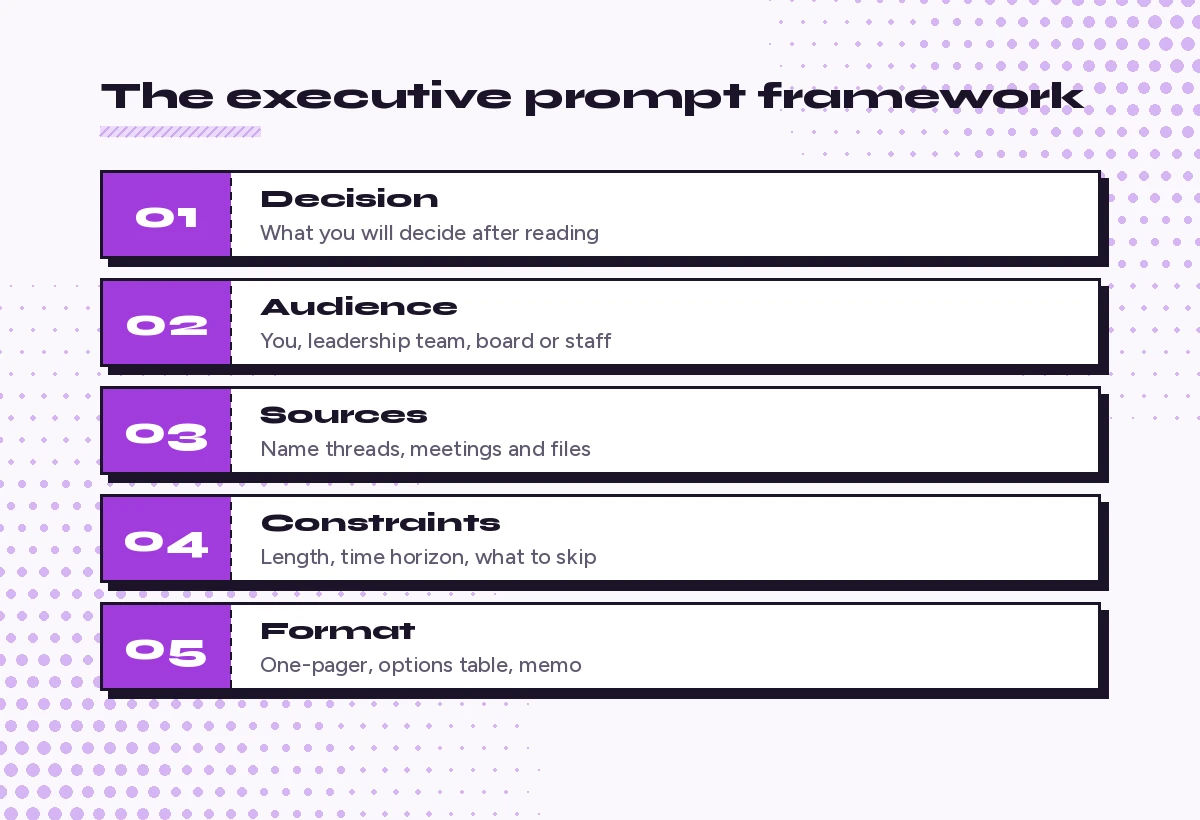
- Decision. What will you decide or approve after reading this?
- Audience. Is this for you, your leadership team, the board or all staff?
- Sources. Name the threads, meetings, reports or folders to use.
- Constraints. Word limit, time horizon, what to leave out.
- Format. One-pager, table of options, talking points, a memo.
Here is how that changes Copilot prompts for executives in practice:
Weak: Summarize the Q3 situation.

Strong: I need to decide by Friday whether to delay the [product] launch.
Using the emails, meeting notes and files from the last [3 weeks] about
[project name], give me a one-page brief: current status, the 3 biggest
risks, what each option (launch / delay 4 weeks / phased) costs us, and
what information is still missing. Cite the source for each point.
For more on structure, our Copilot prompt template breaks down each part with examples.
Daily Briefing and Inbox Prompts
Senior inboxes fill faster than anyone can read them. These templates help you triage without missing the messages that actually need you.
1. Morning leadership brief
Give me a morning brief for today. From my email, Teams chats and
calendar, list: (1) decisions waiting on me, (2) messages from my
leadership team or the board, (3) anything flagged urgent, and (4) the
meetings today where I need to prepare. Keep it under 200 words.
2. Only what needs me
From the unread email in my inbox from the last [2 days], show only the
messages where someone is asking me for a decision, approval or reply.
Group them by sender and say what each person needs, in one line each.
3. Catch up after travel
I was away from [date] to [date]. Summarize what changed in that period
across my email, chats and meetings: key decisions made, issues that
escalated, anything still open with my name on it, and who I should
follow up with first.
For a longer list of inbox routines, see Copilot prompts for Outlook inbox management.
4. Thread to decision memo
Read this email thread about [topic]. Write a short decision memo with
the background, the options people have proposed, who supports each, the
open questions, and a recommended next step. Keep my name out of the
recommendation; I will decide.
5. Delegation sorter
From my flagged emails this week, sort each item into: decide myself,
delegate (suggest to whom on my team based on past threads), or decline.
Give me a one-line reason for each.
Board and Investor Preparation Prompts
Board work rewards preparation and punishes surprises. Copilot can assemble a first draft fast, but every number in it needs a check against your source of record.
6. Board update draft
Draft a board update for [quarter] using [finance report], [KPI
dashboard file] and my notes in [document]. Structure: headline summary,
performance against plan, key wins, key risks, asks of the board. Keep
each section to 3-4 bullets and mark any figure you could not verify in
the source files.
7. Anticipate board questions
Act as a skeptical independent board director. Read [board deck file]
and list the 10 hardest questions you would ask, ranked by how likely
they are to come up. For each, note which slide prompts it and what data
I would need to answer well.
8. Investor talking points
Turn [earnings summary or results file] into 6 talking points for an
investor call. Each point should be one sentence a non-specialist could
repeat, followed by the supporting figure from the file. Flag anything
that could be read as forward-looking guidance so I can review it with
legal.
9. Pre-read compression
Summarize this [40-page] board pre-read into a one-page brief with the
5 points that matter most for the decisions on the agenda. Add a short
list of items I should read in full myself.
10. Board minutes action tracker
From the transcript of today's board meeting, list every action the
board requested, the owner it was assigned to, and any due date
mentioned. Put it in a table and note items where the owner was unclear.
If you capture these meetings in Teams, our guide to Copilot prompts for meeting minutes has more ways to structure the output.
Strategy and Decision-Making Prompts
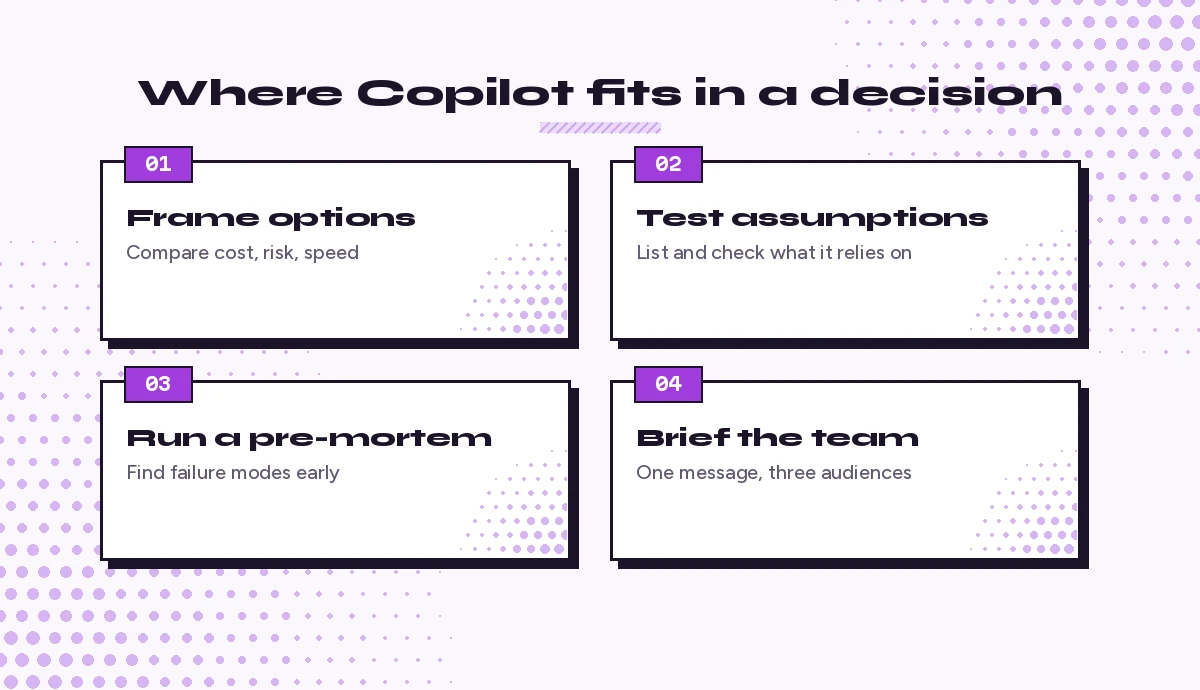
This is where the habit of asking for options and risks pays off. Copilot will not replace your judgment, but it can widen the set of options you consider before you commit.
11. Option comparison table
We are deciding between [option A], [option B] and [option C] for
[goal]. Build a comparison table covering cost, time to impact, risk,
reversibility and effect on [key customer or team]. Use [files] for
facts and mark anything that is your assumption.
12. Pre-mortem
Imagine it is [12 months] from now and our decision to [decision] has
failed. Write the 7 most plausible reasons it failed, ordered by
likelihood, and for each suggest one early warning sign we could track.
13. Assumption check
Read this strategy document: [file]. List the assumptions it depends on,
both stated and unstated. For each, say how we could test it cheaply in
the next 30 days.
14. Second-order effects
If we [decision, e.g., raise prices by 8% / move to a 4-day office
policy], what are the likely second-order effects on customers,
employees, partners and competitors? Separate likely effects from
possible ones.
15. Devil’s advocate
I am leaning toward [decision]. Make the strongest honest case against
it in under 250 words, then tell me what evidence would change your
argument.
16. Strategy on a page
Turn [strategy document] into a one-page summary with: our ambition in
one sentence, 3 strategic priorities, what we will stop doing, the key
metrics and the owner for each priority.
17. Competitor scan
Using public web sources, summarize what [competitor] announced in the
last [quarter] about products, pricing and partnerships. Link every
claim to its source and separate confirmed facts from commentary.
For deep, multi-source research like this, Microsoft’s Researcher agent is often a better fit; our Copilot Researcher prompts show how to use it.
Leadership Communication Prompts
At the top of an organization, every message is read closely. These templates help you get a solid draft quickly, then make it sound like you.
18. All-hands talking points
Write talking points for a [20-minute] all-hands on [topic]. Open with
why it matters to employees, cover [3 points], acknowledge what we don't
know yet, and end with what we need from people. Plain language, no
corporate jargon.
19. Company-wide email
Draft a company-wide email announcing [change]. Audience: [number]
employees across [regions/functions]. Explain what is changing, why,
when, and what it means for each group. Keep it under 300 words and
include where to send questions.
20. Hard news, handled with care
Help me draft a message about [difficult news, e.g., a reorganization].
Be direct about the facts, show respect for the people affected, avoid
promises I can't keep, and list what support is available. Then list
phrases in your draft that might read as cold or evasive.
Before sending anything sensitive, check it with HR and legal, and keep personal details out of shared drafts. Our Copilot prompts for difficult emails cover more of these situations.
21. Rewrite in my voice
Here are 3 emails I wrote recently: [paste or reference]. Describe my
writing style in 5 bullets, then rewrite this draft in that style:
[draft].
22. Leadership team weekly note
From this week's leadership meetings and chats, draft a short note to
my leadership team: decisions made, priorities for next week, and one
thing I want to recognize. Under 200 words.
23. Tailor one message to three audiences
Take this announcement: [text]. Create three versions: one for the
board (strategic, brief), one for managers (what to tell their teams),
and one for frontline employees (practical, what changes for them).
24. Keynote or panel prep
I am speaking on a panel about [topic] at [event]. Suggest a 3-point
narrative, 2 short stories from our work I could use (based on [files]),
and likely audience questions with crisp answers.
Financial Oversight Prompts
You don’t need to build the model yourself, but you do need to understand it fast. Copilot in Excel and Copilot Chat can help you get to the question behind the numbers.
25. Explain the variance
Using [monthly results file], explain the 5 largest variances against
budget in plain language. For each, state the likely driver from the
data and what question I should ask the finance team.
26. KPI health check
Review [KPI dashboard file]. Which metrics moved most in the last
[period], which are trending in the wrong direction, and which look
inconsistent with each other? Keep it to a short list.
27. Scenario summary
Our finance team modeled three scenarios in [file]. Summarize each in
two sentences, compare cash runway and headcount under each, and list
the assumptions that drive the biggest differences.
28. Questions for the CFO
Read [financial pack] and give me 8 sharp questions to ask our CFO
before the board meeting, focusing on risk, cash and anything unusual.
Your finance team will get more from our Copilot prompts for finance, which go deeper into forecasting and analysis.
People and Talent Prompts
Senior leaders shape culture as much through hiring and feedback as through strategy. Handle anything personal with care and follow your company’s HR policies.
29. Interview plan for a senior hire
Create an interview plan for a [role, e.g., VP of Sales]. Include the 5
capabilities that matter most for our situation in [context], 2
behavioral questions per capability, and what a strong answer sounds
like.
30. Leadership team offsite agenda
Design a [1.5-day] leadership offsite agenda focused on [goals]. Balance
strategy sessions, team trust-building and decisions. Include pre-work
for attendees and the output we should leave with.
31. Feedback for a direct report
Help me prepare feedback for [name], a [role]. Strengths: [notes].
Area to improve: [notes]. Write it as specific, observable examples and
one clear expectation, in a supportive but direct tone.
32. Engagement survey themes
Summarize the open-text comments in [survey export file] into the 6 most
common themes, with representative (anonymized) quotes and a suggested
response for leadership on each.
33. Succession snapshot
Using [org notes file], outline a succession snapshot for my direct
reports: role, readiness level as noted, development gaps, and one
action for each. Keep it confidential and factual.
Customer and Market Prompts
It is easy for executives to drift away from customers. These prompts keep their voice close.
34. Customer pulse
From the last [month] of escalation emails and account review notes in
[folder or channel], what are customers praising, complaining about and
asking for? Give three bullets for each, with examples.
35. Key account brief
I meet the CEO of [customer] next week. Brief me on our relationship
from emails, meetings and files: history, current projects, open issues,
recent wins and who on our side knows them best.
36. Market signals digest
Summarize the most relevant public news in [industry] from the last
[two weeks] for a leader at a [company type]. Explain what each item
could mean for us in one line and link sources.
Personal Productivity Prompts for Executives
Your calendar is your strategy in practice. Use Copilot to protect it.
37. Calendar audit
Look at my calendar for the last [4 weeks]. Estimate how my time split
across strategy, internal operations, customers, people and external
events. Suggest which recurring meetings I could shorten, delegate or
drop.
38. Weekly reflection
Based on my meetings, email and chats this week, summarize what moved
forward, what stalled, and the 3 priorities I should protect next week.
39. Meeting I can skip
For [meeting name], summarize the last 3 occurrences from the
transcripts. Did decisions get made? Was my input needed? Recommend
whether I attend, send a delegate or ask for written updates.
40. End-of-day handoff
Write a short end-of-day note to my chief of staff with what I decided
today, what I'm waiting on, and anything they should chase tomorrow.
If an assistant or chief of staff supports you, share our guide to Copilot prompts for executive assistants so you both work from the same playbook.
Using These Copilot Prompts for Executives Safely
A few habits keep senior-level output accurate and appropriate:
- Check every figure. Before a number reaches a board, investor or the press, confirm it in the system of record.
- Ask for sources. Add “cite the source for each point” to any brief you will act on.
- Respect permissions. Copilot follows your existing access, so tidy up overshared files and sites with your IT team.
- Mind disclosure rules. For listed companies, review anything about results or guidance with legal before it leaves the building.
- Keep the final word human. Use drafts as a starting point, then add judgment, context and your own voice.
Building Your Own Executive Prompt Library
The fastest way to get value from Copilot prompts for executives is to keep a short personal library. Save the ten templates you use most in a OneNote page or Word document, refine them each time the output misses, and add your company’s terms, metrics and priorities so you type less every week.
A good routine is to start with three prompts: a morning brief, a decision memo and a weekly leadership note. Once those are part of your rhythm, add board preparation and customer pulse prompts. If you are new to Copilot overall, our Copilot prompts for beginners guide covers the basics your team will need too.
Frequently Asked Questions
What are the best Copilot prompts for executives to start with?
Start with a morning brief, a decision memo built from an email thread and a weekly note to your leadership team. They save time every day and show you quickly how well Copilot can read your email, chats and meetings.
Can Copilot prepare a board deck for me?
It can draft the outline, summarize source files and build a first version of slides in PowerPoint, but a person should check every figure and claim against your official reports before it goes to the board.
Is it safe to use Copilot with confidential strategy documents?
Microsoft 365 Copilot works within your organization’s security and permission settings, so it only uses content you can already access. You should still follow company policy on sensitive material and review access to overshared files with IT.
Do executives need a Microsoft 365 Copilot licence for these prompts?
Prompts that read across your email, meetings, chats and files need a Microsoft 365 Copilot licence. Prompts that use pasted text, uploaded files or the public web can work in the free Copilot Chat included with eligible work accounts.
How do I make Copilot write in my own voice?
Give it two or three emails you wrote, ask it to describe your style, then ask it to rewrite a draft in that style. Edit the result and reuse the style description in later prompts.
How can leaders stop Copilot from making things up?
Name the exact files or threads to use, ask it to cite a source for each point and tell it to list missing information instead of guessing. Then verify names, dates and numbers yourself.