Copilot Prompts for Small Business Owners: 40 Practical Prompts to Save Hours Every Week
Copilot prompts for small business owners work best when they take the admin off your plate: the quote you keep meaning to send, the supplier email you dread writing, the cash-flow sheet nobody has opened since March. When you run a small company you are the marketing team, the finance department and the help desk at once, and Microsoft Copilot can carry a surprising amount of that load if you ask it the right way.
This guide gives you 40 copy-ready prompts sorted by the jobs owners actually juggle: planning, marketing, sales, customers, money, hiring, operations and your own week. Each one has brackets for your details. You will also find a short formula for writing your own, a worked example from a real-world style scenario, and a list of things Copilot should never decide for you.
Where Copilot Fits in a Small Business
You do not need an enterprise IT department to use Copilot. There are a few ways in, and the one you choose changes what it can see.
- Free Copilot app and copilot.microsoft.com. Works with a personal Microsoft account. Good for drafting, brainstorming and web research. It does not see your business files unless you upload them.
- Microsoft 365 Copilot Chat with a work account. If your company uses Microsoft 365 for email, Copilot Chat adds enterprise data protection, so what you paste is handled under your business agreement rather than consumer terms.
- Microsoft 365 Copilot add-on. With a paid Copilot licence, it works inside Word, Excel, Outlook, PowerPoint and Teams, and can draw on your own mail, files and meetings.
Plans, prices and features change, so check the current options on Microsoft’s Copilot support hub before you buy anything. All of the copilot prompts for small business owners below work as plain text in any version; the ones that reference “attached” files just need a version that accepts uploads.
A Simple Formula for Copilot Prompts for Small Business Owners
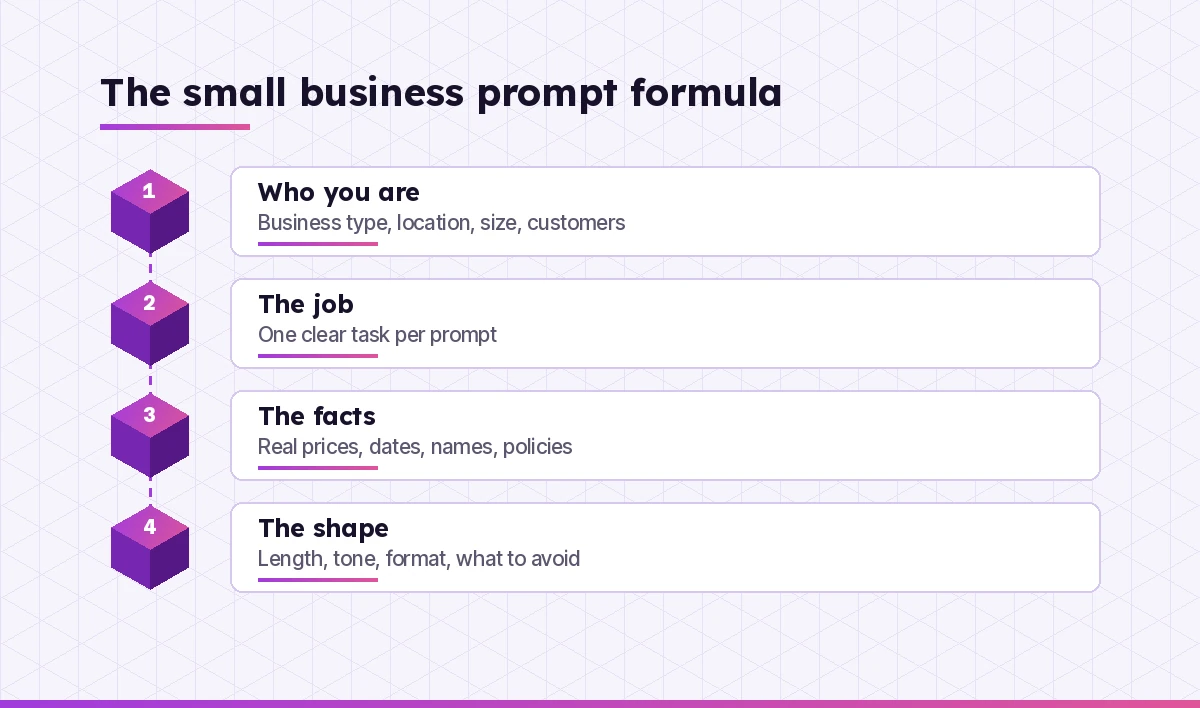
Owners tend to type short requests because they are busy. “Write a Facebook post about our sale” will get you something, but it will sound like every other shop. Spend twenty extra seconds and give Copilot four things:
- Who you are. Business type, location, size and the customers you serve.
- The job. One clear task, such as a follow-up email, a price comparison or a staff rota.
- The facts. Real prices, dates, names, policies or numbers. Paste them in; do not make Copilot guess.
- The shape. Length, tone, format and anything to avoid.
Here is the difference.
Weak: Write a post about our sale.

Strong: I run a family bakery in a small town. We serve locals and
office workers who grab lunch. Write a short Instagram caption for our
Friday half-price sourdough offer (after 3 pm only, while stock lasts).
Tone: warm, a little playful, no hard selling. Under 60 words, 2 emojis
max, end with our address: [address].
The strong version takes longer to type once. Save it, and next week you only change the offer.
Prompts for Planning and Strategy
Planning is the work that gets pushed aside when the phone keeps ringing. These copilot prompts for small business owners turn a vague worry into something you can act on.
1. One-page business plan
Act as a small business advisor. I run [business type] in [location]
with [number] staff. Using the notes below, draft a one-page plan with:
what we sell, who buys, how we reach them, how we make money, top 3
risks and 3 goals for the next 12 months. Notes: [paste notes]
2. SWOT you can actually use
Do a SWOT analysis for my [business type] based on these facts: [paste].
For every weakness and threat, suggest one practical action a business
with a small budget could take in the next 90 days.
3. Quarterly goals
Here is how the last quarter went: [paste revenue, key wins, problems].
Suggest 3 measurable goals for next quarter, with a weekly action for
each and a simple way to track progress in a spreadsheet.
4. Pressure-test an idea
I'm thinking about [new product / second location / delivery service].
Ask me 10 hard questions a cautious investor would ask before I commit
money. Then list the cheapest way to test the idea first.
5. Competitor snapshot
Search the web for [business type] businesses in [area]. Build a table:
name, what they offer, apparent price level, what customers praise in
public reviews, and a gap I could fill. Mark anything you're unsure of.
Prompts for Marketing on a Small Budget
You probably do not have an agency. Copilot can draft the first version of almost any piece of marketing, which you then edit so it sounds like you. Our full set of Copilot prompts for marketing goes deeper on campaigns and content calendars.
6. A month of social posts
Create a 4-week social media plan for my [business]. 3 posts a week.
Mix tips, behind-the-scenes, customer stories and one offer per week.
For each post give the idea, a caption under 80 words and a photo idea
I can take on my phone.
7. Google Business Profile description
Write a Google Business Profile description for [business name], a
[type] in [location]. Mention [services], [what makes us different] and
[opening hours note]. Natural language, no keyword stuffing, under 700
characters.
8. Website “About us” page
Here is our story in rough notes: [paste]. Turn it into an About page of
about 250 words. First person plural, honest and specific, no clichés
like "passionate about excellence". End with a gentle call to visit or
get in touch.
9. Email newsletter
Write a short monthly newsletter for our customers. Include: [news item],
[seasonal tip], [offer with end date]. Subject line options x3, a
friendly intro of 2 sentences, three short sections and a sign-off from
[owner name].
10. Reply to a review
Draft a reply to this public review: "[paste review]". Thank them,
address the specific point, avoid sounding defensive, and offer to fix
it offline at [contact]. Under 90 words.
11. Promotion ideas
Suggest 8 low-cost promotion ideas for a [business type] during
[season / slow month]. For each, estimate effort (low/medium/high) and
say what I'd need to prepare. Avoid deep discounts.
Prompts for Sales, Quotes and Proposals
Small businesses lose work simply because quotes go out late or follow-ups never happen. The copilot prompts for small business owners in this section help you move faster without sounding rushed. If you write longer bids, see our Copilot prompts for proposal writing.
12. Quote email
Write an email sending a quote to [client name] for [job]. Price:
[amount], includes [items], excludes [items], valid until [date],
start date [date]. Clear, friendly, confident. End with one simple next
step.
13. Follow up without nagging
I sent a quote to [client] on [date] and haven't heard back. Write 2
follow-up emails: one for this week and one for two weeks later. Short,
polite, and give them an easy way to say no.
14. Handle a price objection
A customer says our price of [amount] for [service] is too high compared
with [competitor]. List 5 honest ways to respond that explain value
without trashing the competitor, plus one option to adjust scope instead
of cutting price.
15. Simple sales script
Write a 60-second phone script for calling past customers of my
[business] to tell them about [new service]. Natural, not pushy, with
two likely questions and good answers.
16. Upsell ideas
Here is what we sell and our typical order: [paste]. Suggest 5 add-ons
or bundles that genuinely help the customer, and a one-line way staff
could mention each at checkout.
Prompts for Customer Service
Good service is often the reason customers choose a small business over a chain. Copilot helps you stay calm and consistent when you are tired. For more scenarios, browse our Copilot prompts for customer service.
17. Calm reply to an angry customer
Here is a message from an upset customer: "[paste]". Draft a reply that
acknowledges their frustration, explains what happened in one sentence,
and offers [refund / redo / discount]. Warm, short, no corporate jargon.
18. FAQ page
These are the questions customers ask us most: [list]. Turn them into an
FAQ page with clear, short answers using these policies: [paste]. Flag
any question my policies don't cover yet.
19. Policy in plain English
Rewrite our returns and refunds policy so a customer can understand it in
30 seconds: [paste]. Keep every condition, but use plain words and
bullet points.
20. Saved replies
Create 6 saved replies for common messages we get on WhatsApp and email:
opening hours, booking changes, delivery times, prices, a delay and a
thank-you. Each under 50 words, in a friendly tone.
Prompts for Money, Pricing and Cash Flow
Copilot is useful for thinking through numbers, but treat its maths as a draft. Check every figure, and lean on your accountant for tax decisions. Our Copilot prompts for finance cover budgeting and reporting in more detail.
21. Set a price
Help me price [product/service]. My costs: materials [amount], time
[hours] at [rate], overheads about [amount] per job. Competitors charge
roughly [range]. Show 3 price options with the margin for each, and the
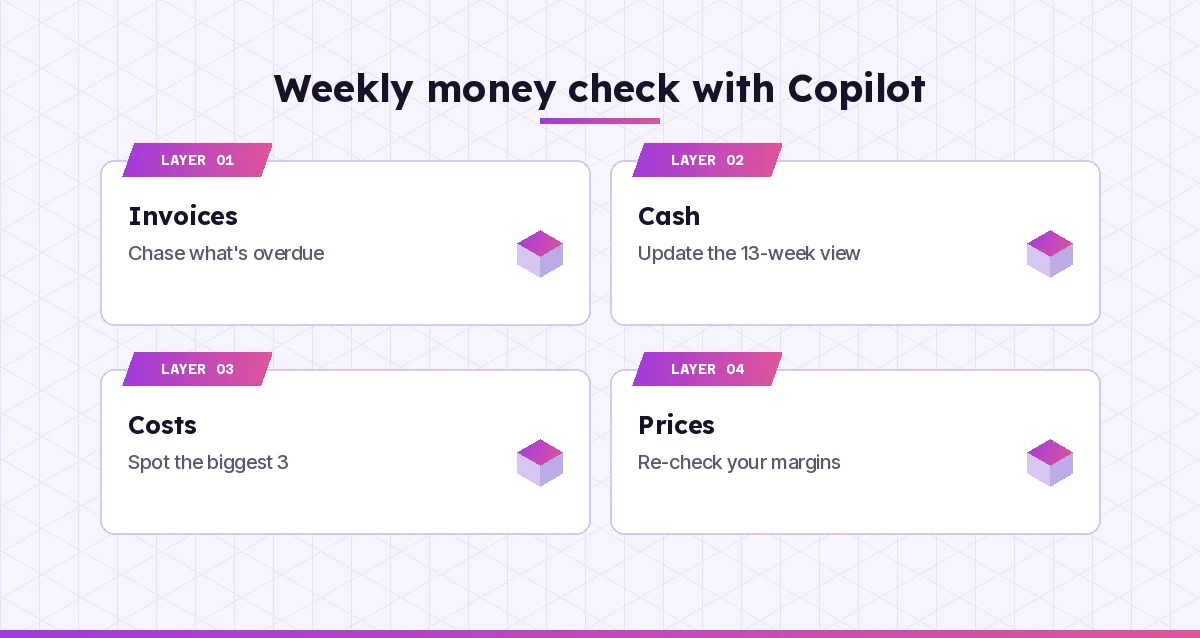
trade-offs.
22. Cash-flow forecast layout
I want a simple 13-week cash-flow forecast in Excel. Suggest the columns
and rows, the formulas for running balance, and how to highlight weeks
where cash drops below [amount].
23. Spot cost savings
Here are our monthly expenses: [paste list]. Group them into categories,
point out the biggest 3, and suggest questions I should ask suppliers to
lower each one. Don't recommend cutting anything customer-facing.
24. Polite overdue invoice reminder
Write 3 reminders for an unpaid invoice [number] for [amount], due
[date]: a friendly nudge at 3 days late, a firmer note at 14 days, and a
final notice at 30 days that mentions our late payment terms: [terms].
25. Explain a report to me
Here is my profit and loss summary: [paste]. Explain in plain English
what it says about the business, what changed from last period, and 3
questions I should ask my accountant.
26. Break-even check
My fixed monthly costs are [amount]. Each sale brings in [price] and
costs [variable cost]. Work out how many sales I need to break even each
month, show the calculation, and explain it in two sentences.
Prompts for Hiring and Managing a Small Team
When you have three or ten staff, every hire matters. Copilot helps you write clearly and fairly, but keep final people decisions human.
27. Job ad
Write a job ad for a [role] at my [business] in [location]. Hours
[hours], pay [range], must-haves [list], nice-to-haves [list]. Honest
about the job, friendly about the team, under 300 words.
28. Interview questions
Give me 8 interview questions for a [role] that reveal reliability,
customer manner and problem solving. For each, say what a strong answer
sounds like. Avoid questions about age, family or health.
29. First-week onboarding plan
Create a day-by-day first-week plan for a new [role]. Include what they
learn, who shows them, and a short checklist I can tick off. Keep it
realistic for a business of [number] people.
30. Staff rota
Here are my staff, their availability and our busy hours: [paste]. Draft
a weekly rota that covers every shift with at least [number] people at
peak times. Flag any gaps or anyone over [hours] hours.
31. Hard conversation prep
I need to talk to an employee about [issue, e.g. repeated lateness]. Help
me plan the conversation: an opening line, the facts to mention, questions
to ask, and how to agree next steps. Calm and respectful.
Prompts for Operations and Admin
Operations is everything that has to happen so the doors stay open. These copilot prompts for small business owners help you write it down once instead of explaining it every week.
32. Standard operating procedure
Turn these rough notes on how we [open the shop / pack orders / close
the till] into a step-by-step checklist a new staff member can follow:
[paste]. Number the steps and mark the ones that matter for safety.
33. Compare suppliers
Here are quotes from 3 suppliers: [paste]. Compare them in a table by
price, delivery time, minimum order, payment terms and anything unusual
in the small print. Then list questions to ask before I choose.
34. Negotiate with a supplier
Draft an email to [supplier] asking for better terms on [item]. We've
ordered for [time] and spend about [amount] a month. Ask for [discount /
longer payment terms / free delivery], firmly but politely.
35. Inventory sheet
Design a simple inventory tracker in Excel for a [business type]. Columns
for item, supplier, unit cost, stock on hand, reorder level and status.
Give the formula that marks an item "Reorder" when stock is low.
36. Summarize a contract
Summarize this agreement in plain English: [paste or attach]. List what I
must do, what they must do, fees, renewal and cancellation terms, and any
clause I should ask a lawyer about.
Prompts for Your Own Time and Focus
The business owner is usually the bottleneck. These last copilot prompts for small business owners are about protecting your own week.
37. Weekly plan
Here is everything on my plate this week: [paste list]. Sort it into must
do, should do and can wait. Suggest which tasks I could delegate, batch
or drop, and draft a realistic schedule with two focus blocks.
38. Clear the inbox
I'm pasting 10 emails below. For each one, give a one-line summary, say
whether it needs a reply today, and draft a short reply where needed:
[paste emails]
39. Decision helper
I'm deciding between [option A] and [option B]. Lay out pros, cons,
costs, risks and what I'd need to believe for each to be the right
choice. Then ask me 3 questions to help me decide.
40. End-of-month review
Help me run a 20-minute monthly review. Ask me one question at a time
about sales, customers, staff, cash and my own energy. After my answers,
summarize the 3 things to change next month.
A Worked Example: A Plumbing Business in One Afternoon
Picture a two-van plumbing business. The owner spends evenings on paperwork and wants the time back. Here is how a single session might go.
- Quotes. They paste the job notes from three site visits into prompt 12 and send tidy quote emails before lunch rather than at midnight.
- Follow-ups. For two older quotes, prompt 13 produces a gentle nudge for each. One customer books the same day.
- Reviews. A mixed review about a late arrival gets a calm answer through prompt 10, with an apology and a direct phone number.
- Money. Prompt 24 writes three invoice reminders they can reuse forever, and prompt 22 sets up a basic cash-flow sheet that shows a tight week coming.
- Team. Prompt 32 turns a voice-note explanation of the van checklist into a numbered procedure for the new apprentice.
Nothing here required special software beyond a few copilot prompts for small business owners, and every final word went out under the owner’s own judgement. The difference was starting from a decent draft instead of a blank page. If you want to build a visual tracker from that cash-flow sheet later, our Copilot prompts for Excel dashboards show how.
What Copilot Should Not Decide for You
Copilot is a capable assistant, not a licensed advisor. Keep these areas firmly in human hands.
| Area | Use Copilot for | Leave to a person |
|---|---|---|
| Tax and accounts | Explaining terms, preparing questions | Filings, deductions and final figures |
| Legal | Plain-English summaries, first-draft letters | Contracts you sign, disputes, employment law |
| Hiring | Job ads, interview structure | Who gets hired or let go |
| Pricing | Scenario maths and options | The final price and its fit with your brand |
| Customer data | Templates and wording | Pasting private details into a personal account |
A good rule: if a mistake could cost you a fine, a lawsuit or a customer’s trust, Copilot drafts and a qualified person signs off.
Tips to Get More From Copilot Prompts for Small Business Owners
- Build a business brief. Write a short paragraph about your company, customers and tone, and paste it at the top of new chats. Copilot’s answers instantly sound more like you.
- Keep a prompt file. Store your best versions of these prompts in a Word or OneNote page so staff can reuse them.
- Give real numbers. Copilot cannot know your margins or opening hours. The more facts you supply, the less it invents.
- Ask for options. “Give me 3 versions” is faster than rewriting one draft five times.
- Edit for your voice. Read every draft aloud. If it sounds like a corporation, ask for “simpler and more local”.
- Protect privacy. Use a work account with data protection for anything involving customers or staff, and remove details you do not need.
New to all of this? Our guide on how to write Copilot prompts explains the basics, and Microsoft’s own Copilot documentation covers setup and admin for business accounts.
Final Thoughts
Running a small business means doing ten jobs badly or finding help for some of them. These copilot prompts for small business owners give you that help for the writing, planning and number-crunching that eat your evenings. Start with the five prompts that match your biggest headaches, fill in real details, and keep the versions that work. Within a few weeks you will have a personal toolkit that saves hours, while the decisions that shape your business stay exactly where they belong: with you.
Frequently Asked Questions
Is Microsoft Copilot useful for a small business?
Yes, especially for writing and admin. Owners use it to draft emails, quotes, social posts, job ads, policies and procedures, and to think through pricing or cash-flow questions. It works best when you give it real details about your business and check its output before using it.
Do I need a paid Microsoft 365 Copilot licence?
No. The free Copilot app can handle most of the prompts in this guide if you paste in your information. A paid Microsoft 365 Copilot licence adds the ability to work inside Word, Excel, Outlook and Teams and to draw on your own business files and email.
Is it safe to paste customer or business data into Copilot?
With a work account, Microsoft 365 Copilot Chat applies enterprise data protection to what you share. With a personal account, avoid pasting private customer, staff or financial details unless you are comfortable with consumer terms, and only include the information the task really needs.
Can Copilot do my bookkeeping or taxes?
Copilot can explain financial terms, help you lay out spreadsheets and prepare questions for your accountant, but it should not be relied on for tax filings or final accounts. Its calculations can contain mistakes, so always check figures and use a qualified professional for tax decisions.
What are the best Copilot prompts to start with as a business owner?
Start with the jobs that cost you the most time each week. For many owners that means quote emails, invoice reminders, customer replies and a weekly planning prompt. Save the versions that work and reuse them with new details.
How do I make Copilot sound like my business and not a robot?
Give it a short brief about your business, customers and tone at the start of each chat, include real examples of how you write, and ask for plainer or more local wording when a draft feels generic. Reading drafts aloud before sending also helps you catch stiff phrasing.