Copilot Prompts for Students: 40 Smart Prompts to Study, Write and Revise Better
Copilot prompts for students work best when they make you think harder, not less. Microsoft Copilot can explain a confusing topic in plain words, quiz you before an exam, turn messy lecture notes into flashcards and give honest feedback on an essay draft. Used the lazy way, it just hands you answers you will not remember next week.
This guide collects 40 copy-ready prompts grouped by the job in front of you: understanding a topic, active recall, essay writing, reading and research, maths and science, exam revision, time management and group work. Each one is written to keep you in charge of the learning. You will also find a simple prompt formula, a worked example and clear rules for staying on the right side of your school’s academic integrity policy.
Where Students Can Use Microsoft Copilot
Copilot shows up in a few different places, and what you can do depends on which one you have.
- The free Copilot app and website. Anyone with a personal Microsoft account can chat, upload a file or image, and ask questions. This is where most of the prompts below will be tried first.
- Copilot Chat with a school account. Many schools switch on Microsoft 365 Copilot Chat for students, often with age limits and extra data protection. If you sign in with your school email and see a green shield or a “protected” label, your chats are covered by your school’s agreement with Microsoft.
- Copilot inside Word, PowerPoint, OneNote and Excel. Some personal and school plans include Copilot in the Office apps, where it can work directly on the file you have open.
Availability changes by plan, region and school policy, so check what your account shows rather than assuming. Microsoft keeps an up-to-date overview on its Copilot support hub. The good news is that every prompt here works as plain text in any of those places.
A Simple Formula for Better Study Prompts
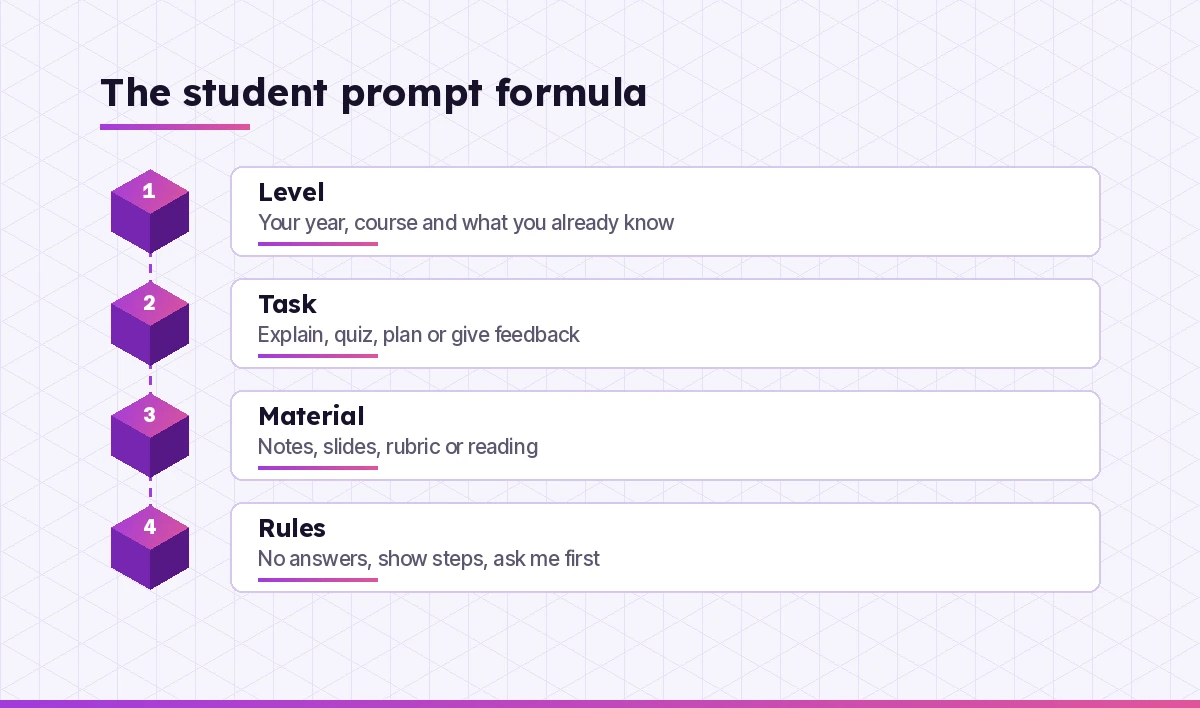
Most weak copilot prompts for students are missing context. “Explain mitosis” gets you a textbook paragraph. Tell Copilot who you are and what you need, and the reply suddenly fits your course.
- Level. Your year or course, the exam board if there is one, and what you already understand.
- Task. Explain, quiz, plan, compare, summarise or give feedback. Pick one verb.
- Material. Paste your notes, upload slides or describe the rubric so the answer matches your class.
- Rules. Tell it how to help: “don’t give me the answer,” “show each step,” “ask me one question at a time.”
Here is a reusable template. Copy it and fill the brackets.
I'm a [year / course] student studying [topic]. I already understand
[what you know] but I'm stuck on [what confuses you].
Task: [explain / quiz me / make a plan / give feedback].
Use this material: [paste notes or describe the source].
Rules: [e.g. don't give final answers, use simple language,
ask me one question at a time, keep it under 200 words].
For a deeper breakdown of why context matters so much, see our guide on how to write Copilot prompts.
Copilot Prompts for Students Who Need a Topic Explained
Start here when a lesson went over your head. These copilot prompts for students ask Copilot to teach rather than to do the work for you.
1. Explain it like I’m new to it
Explain [topic] to me as if I'm hearing about it for the first time.
Use one everyday example, then one example from [my subject].
Finish by asking me a question to check I understood.
2. Fix my mental model
Here is how I currently understand [topic]: [your explanation].
Tell me which parts are correct, which parts are wrong or missing,
and why. Don't rewrite it for me; point out the gaps.
3. Three levels of depth
Explain [concept] three times: first in one sentence, then in a short
paragraph for a [year] student, then in more detail with the key terms
my teacher will expect me to use.
4. Compare two confusing ideas
I keep mixing up [idea A] and [idea B]. Make a table comparing them on
definition, example, when each applies and a common exam trap.
5. Walk me through a diagram
I've uploaded a diagram from my notes. Describe what each labelled part
shows and how the parts connect. Then ask me to explain one part back
to you.
6. Find the prerequisite I’m missing
I don't understand [topic]. List the three ideas I need to know first,
in order, and give me a one-line check question for each so I can see
which one I'm missing.
Active Recall and Flashcard Prompts
Rereading notes feels productive but fades fast. The copilot prompts for students in this section turn your material into self-tests instead. Testing yourself is one of the most reliable study habits, and Copilot makes it quick to set up.
7. Quiz me one question at a time
Quiz me on [topic] for a [year / exam] level. Ask one question at a
time, wait for my answer, then tell me if I'm right and why. Get harder
when I answer correctly, easier when I miss.
8. Turn my notes into flashcards
Turn these notes into 15 flashcards. Format each as "Front:" and
"Back:" with the back under 25 words. Focus on definitions, key dates
and cause-and-effect links.
[paste notes]
9. Mixed practice from several topics
Give me 10 mixed questions covering [topic 1], [topic 2] and
[topic 3], in random order, without saying which topic each comes from.
Hold the answers until I reply with mine.
10. Explain my wrong answers
Here are the questions I got wrong and my answers: [paste].
For each one, explain the mistake in my thinking, not just the right
answer, and give me one similar question to try again.
11. Fill-in-the-blank summary
Write a 150-word summary of [topic] with 8 key terms replaced by
blanks. Give me the word bank at the end, shuffled.
Essay and Writing Prompts That Keep It Your Work
These copilot prompts for students treat the tool like a writing tutor. You still choose the argument and write the sentences.
12. Unpack the essay question
My essay question is: "[question]". Break down what it's really asking,
list the command words and what each means, and suggest three angles I
could take. Don't write any paragraphs.
13. Test my thesis
My thesis is: "[thesis]". Is it arguable, specific and answerable in
[word count] words? Give me two counterarguments I should address.
14. Outline check
Here is my essay outline: [paste]. Check whether each section supports
the thesis, flag any jumps in logic and suggest one piece of evidence
type I should look for in each section.
15. Feedback against the rubric
Here is the marking rubric: [paste]. Here is my draft: [paste].
Score each rubric criterion from 1 to 5 with one sentence of reasoning
and one specific improvement. Don't rewrite my text.
16. Tighten one paragraph
Point out wordy phrases, vague claims and missing evidence in this
paragraph. List them as bullet points so I can fix them myself:
[paste paragraph]
17. Better transitions
Read the last sentence of each of my paragraphs and the first sentence
of the next. Tell me where the flow breaks and suggest what kind of link
is missing (contrast, cause, example, sequence).
If you draft in Word, our Copilot prompts for Word guide has more editing prompts that work right inside your document.
Reading and Research Prompts
Long readings and academic papers are where copilot prompts for students save the most time, as long as you check what it tells you.
18. Summarise a reading for seminar prep
Summarise this reading in 5 bullet points, then list 3 questions I
could raise in a seminar discussion and 1 point the author doesn't
fully prove.
[paste text or upload the file]
19. Decode a dense paragraph
Rewrite this paragraph in plain English, then list any technical terms
with a short definition each: [paste paragraph]
20. Build a search plan
I'm researching [topic] for a [type of assignment]. Suggest 8 search
keyword combinations for my library database, plus synonyms and
related terms I might be missing.
21. Evaluate a source
Help me judge this source: [title, author, publisher, date]. Walk me
through who wrote it, why, how current it is and what bias it might
have. Ask me questions rather than deciding for me.
22. Compare two articles
I've uploaded two articles on [topic]. Compare their main claims,
methods and conclusions in a table, and note where they disagree.
Always open the original source before quoting it. Copilot can misread a document or blend in outside information, and your teacher will cite the page, not the chat. For PDFs specifically, our Copilot summarise PDF prompts go into more detail.
Maths, Science and Coding Prompts
For problem-based subjects, the best copilot prompts for students ask for hints and steps instead of final numbers.
23. Hint, don’t solve
Here is a problem I'm stuck on: [problem]. Give me only the first hint.
Wait for my next attempt before giving another hint. Never show the
final answer unless I type "reveal".
24. Check my working
Here is my full working for this problem: [paste]. Find the first line
where I went wrong and explain the mistake. Don't finish the problem.
25. Similar practice problems
Create 5 practice problems like this one, from easiest to hardest:
[paste example]. Put answers at the very end, separated by a line.
26. Explain a formula’s meaning
Explain what each symbol in [formula] represents, what happens to the
result when each one increases, and a real situation where I'd use it.
27. Lab report structure
I'm writing a lab report on [experiment]. Explain what belongs in each
section (aim, method, results, discussion, evaluation) and give me
questions to answer in my discussion. Don't write it for me.
28. Understand my code error
My [language] code gives this error: [error message]. Here's the code:
[paste]. Explain what the error means and where to look, but let me
write the fix.
Exam Revision Prompts
Copilot is a patient revision partner, and these copilot prompts for students are built around spaced, mixed practice. Use these in the weeks before an exam rather than the night before.
29. Build a revision timetable
My exams are: [subject, date] for each. I can study [hours] on weekdays
and [hours] at weekends. Build a revision timetable that mixes subjects,
repeats each topic at least twice with gaps of a few days, and leaves
one rest evening a week.
30. Topic checklist from a syllabus
Here is my course syllabus: [paste]. Turn it into a checklist of topics
I can rate red, amber or green, grouped by unit.
31. Practice exam questions
Write 6 exam-style questions on [topic] for [exam / level], mixing
short answer and one longer question. After I answer, mark them like a
strict examiner and explain where I'd lose marks.
32. Model answer comparison
Here is my answer to a past paper question: [paste]. Without rewriting
it, tell me what a top-band answer would include that mine doesn't.
33. Last-week cram priorities
I have [days] left before my [subject] exam. These are my weakest
topics: [list]. Rank them by how much they're likely to help my score
and give me a 30-minute task for each.
Time Management and Organisation Prompts
Study skills are not just about content. These copilot prompts for students help you plan the week and break big tasks into small ones.
34. Break down a big assignment
I have a [assignment type] due on [date], about [topic]. Break it into
small tasks of 30 to 60 minutes and schedule them backwards from the
deadline, leaving two buffer days.
35. Plan my week
Here are my classes, shifts and deadlines this week: [list]. Suggest a
realistic plan with study blocks, breaks and one catch-up slot. Flag
anything that clashes.
36. Beat procrastination
I keep avoiding [task]. Ask me three short questions to find out why,
then suggest the smallest possible first step I can do in 10 minutes.
If you keep class notes in OneNote, our Copilot OneNote prompts show how to organise and summarise notebooks directly.
Group Project and Presentation Prompts
Group work goes smoother when everyone agrees on who does what. Use these copilot prompts for students to organise the team and rehearse the final presentation.
37. Split the work fairly
Our group of [number] is doing a project on [topic], due [date].
Suggest a fair split of tasks, a check-in schedule and a simple way to
track who's doing what.
38. Meeting notes to action list
Here are our group meeting notes: [paste]. Turn them into a list of
decisions and an action list with owner and due date for each item.
39. Slide outline from my research
Turn these research notes into an outline for a [number]-slide
presentation. One main point per slide, with a note on what visual
would help. I'll write the speaker notes myself.
[paste notes]
40. Rehearse the Q&A
I'm presenting on [topic] to my class. Act as a curious classmate and
ask me 5 tough questions one at a time. After each answer, tell me how
clear it was.
For more on building slides, see our Copilot PowerPoint prompts.
Worked Example: From “Explain This” to Real Understanding
Imagine a biology student who missed a lesson on enzymes. A typical first attempt looks like this: “Explain enzymes.” Copilot replies with a solid but generic paragraph, and the student copies it into their notes without really taking it in.
Now the same student uses the formula. They say they are in their second year of high school biology, they know what proteins are, and they are confused about why temperature changes how enzymes work. They paste the two slides from class and add a rule: explain in under 150 words, then ask one question.
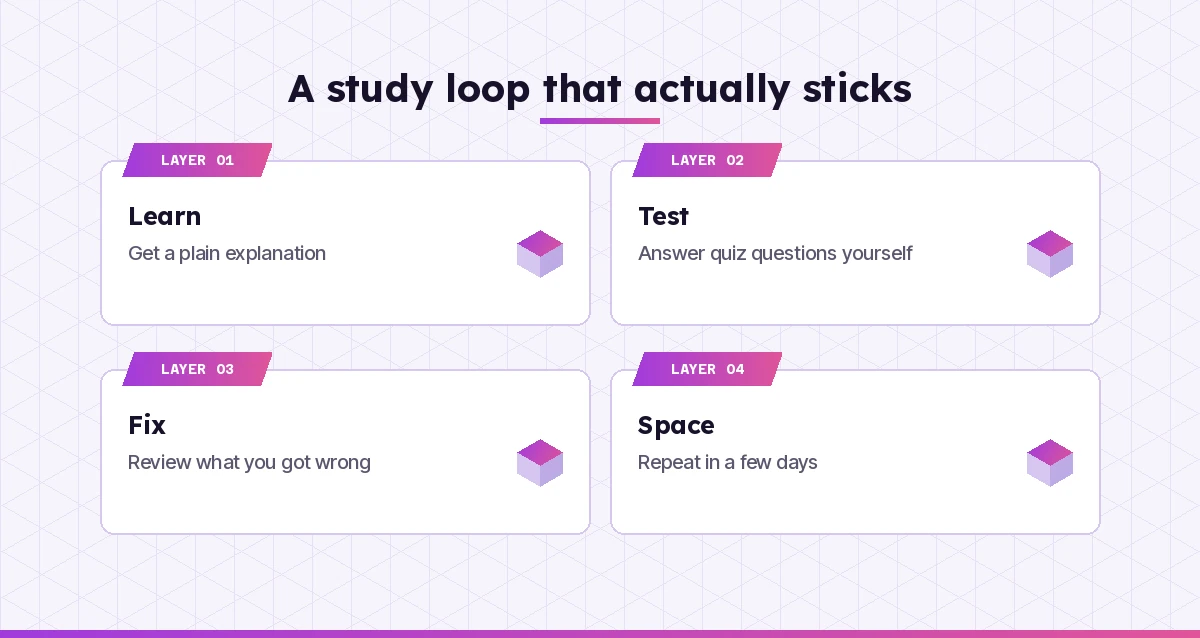
The reply now uses the same terms as the slides, focuses on the active site and shape changes, and ends with a check question. The student answers it, gets one detail wrong, and asks Copilot to explain the mistake. Ten minutes later they ask for five flashcards from the conversation and save them. Three days later they run prompt 7 on the same topic to see what stuck. That loop of explain, test, correct and repeat is where the learning happens.
Using Copilot Honestly at School
Even the best copilot prompts for students need to sit inside your school’s rules. Every school sets its own rules on AI, and they can differ between teachers on the same course. A few habits keep you safe.
- Read the policy for each assignment. Some tasks allow AI for brainstorming but not drafting. Others ban it entirely. When in doubt, ask your teacher.
- Never submit generated text as your own. Use Copilot for explanations, feedback and practice. Write the final work yourself.
- Say when you used it. If AI is allowed, many schools expect a short note on how you used it. Keep your chat so you can show your process.
- Check every fact. Copilot can be confidently wrong, especially with dates, quotes, citations and calculations. Verify against your textbook or the original source.
- Protect your privacy. Don’t paste other people’s personal details, and use your school account when your school asks you to.
Microsoft’s AI for education resources explain how schools are approaching these tools, which is useful context for both students and parents. Teachers looking at the other side of the classroom can browse our Copilot prompts for teachers.
Common Mistakes Students Make With Copilot
| Mistake | What happens | Better approach |
|---|---|---|
| Asking for the answer | You get a result you can’t reproduce in the exam | Ask for hints, steps or a check of your working |
| No context about your level | Explanations are too simple or too advanced | State your year, course and what you already know |
| Trusting citations | Some references may not exist or may be misquoted | Find and open every source yourself |
| One long chat for everything | Older topics confuse newer answers | Start a fresh chat for each subject or task |
| Copying feedback blindly | Your voice disappears from your writing | Ask for bullet-point feedback, then edit yourself |
| Cramming with AI the night before | Little sticks long-term | Use quiz and spacing prompts over several weeks |
Make Your Best Prompts Reusable
Once one of these copilot prompts for students works for you, save it. Keep a “study prompts” page in OneNote or a note on your phone, and swap the brackets each time. Over a term you will build a small personal toolkit: a quiz prompt, a flashcard prompt, a feedback prompt and a planning prompt. That is usually all you need. Our Copilot prompt cheat sheet is a handy starting point if you want more ready-made patterns.
The students who get the most from Copilot are not the ones who ask it to do the most. They ask it to explain, question and challenge them, and they do the remembering and writing themselves.
Frequently Asked Questions
What are the best Copilot prompts for students?
The most useful ones ask Copilot to explain a topic at your level, quiz you one question at a time, turn notes into flashcards, give rubric-based feedback on a draft and build a revision timetable. Prompts that ask for hints and feedback help you learn more than prompts that ask for finished answers.
Is Microsoft Copilot free for students?
The Copilot app and website are free with a personal Microsoft account. Many schools also give students Microsoft 365 Copilot Chat through their school account, sometimes with age limits. Copilot inside Word, PowerPoint and other Office apps depends on your plan or your school’s licences.
Can I use Copilot to do my homework?
You can use it to understand the homework, check your working and practise similar questions. Submitting text or answers that Copilot produced as your own work usually breaks academic integrity rules, so always check your school’s policy for each assignment.
Can Copilot make flashcards from my notes?
Yes. Paste your notes or upload the file and ask for a set number of flashcards with a front and back. Ask for short backs, under about 25 words, so they are quick to review, then test yourself on them over several days.
Will my teacher know I used Copilot?
Many teachers can spot generic AI writing, and some schools use detection tools, although these are not always reliable. The safest approach is to follow the assignment rules, write the final work yourself and openly note how you used AI when it is allowed.
How do I stop Copilot from just giving me the answer?
Add a clear rule to your prompt, such as “give me only the first hint,” “don’t show the final answer” or “ask me one question at a time.” If it slips, remind it of the rule in your next message and it will usually go back to step-by-step help.